CFD Optimization Best Practices
Before you jump into automated optimization processes, it is recommended to learn as much as possible beforehand, with a minimum of expensive simulation runs.
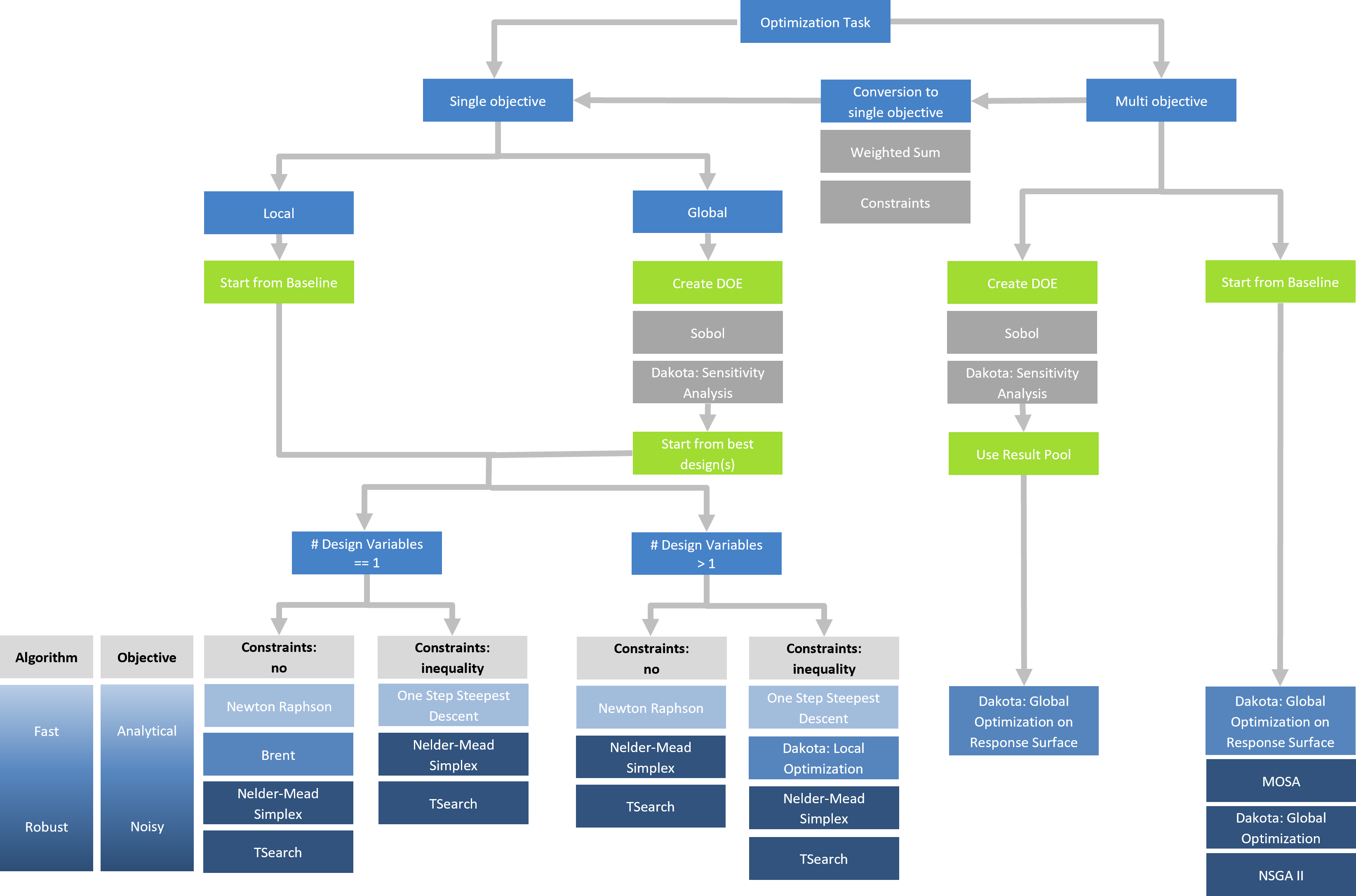
Start with a Sampling
As a starting point, run a Sobol (a design space exploration / design of experiments (DoE) algorithm) to get a better understanding of what's actually happening when changing design variables. If you are a user of the advanced optimization add-on, choose the sampling or adaptive sampling from the Dakota design engine.
You can use sampling methods such as the Sobol also for checking the robustness of your geometry model. Just run a study without any simulation runs and check for open edges of your BRep, volumes etc.
Understand and Investigate
Don't simply start an optimization at this stage. Check the tables of the sampling run, explore the 2D charts for correlations, and also find out which variables you can omit in the next step (to save computational time). Check whether there is a trend in your data base. Does it makes sense from a physical point of view, or is there still possibly an error in your meshing or analysis setup?
Optimization
There are several steps you can take from here, i.e., if you have a pool of sampled designs and you feel confident that things are OK in your setup.
Global Optimization on Response Surface
You can check whether a response-surface based optimization (Dakota design engine) is suitable for your problem. Use a low number of iterations in the first stage by setting the attribute “Iterations” to 1, 2 or 3.
Check the generated designs in the design table, i.e., whether they improve and move into the right direction (into a minimum or maximum, respectively). If things look promising, continue with a higher number of iterations (e.g. 10), depending on your computational resources. You can also recycle the previous design results by selecting them as result pool for the next run.
Local Optimization
Instead of running a global optimization on a response surface, you can pick a few promising designs from the sampled pool and run a local optimization using the TSearch algorithm, or choose the Local Optimization and the Multi-Start Local Optimization methods from Dakota.
In some situations, the "Local Optimization" shows better results compared to the TSearch algorithm.
Global Optimization
In case you have simulation runs that are not that expensive (e.g. fast potential solvers or some fast calculators), you can also use the "Global Optimization" from the Dakota design engine.
Alternatively, you can use the NSGA-2 or MOSA that both show a similar performance for multi-objective problems when comparing them to the "Global Optimization" strategy.