Ship Modeling Workflows
The Ship Modeling Workflows in CAESES provide a streamlined step-by-step guide for the creation of ship hulls and boat hulls. The workflows encapsulate the ship as an entity in a Ship Object, complete with its own properties and methods. This offers the user several advantages:
- Guided Setup: The workflow offers a quick setup of fully parametric hull designs, while allowing full flexibility.
- Enhanced Structure: Organize the geometric and parametric modeling of the ship hull effectively.
- Direct Information Access: Retrieve details about the ship using simple commands.
- Hydrostatics Calculation: Perform hydrostatic calculations directly from the Ship Object.
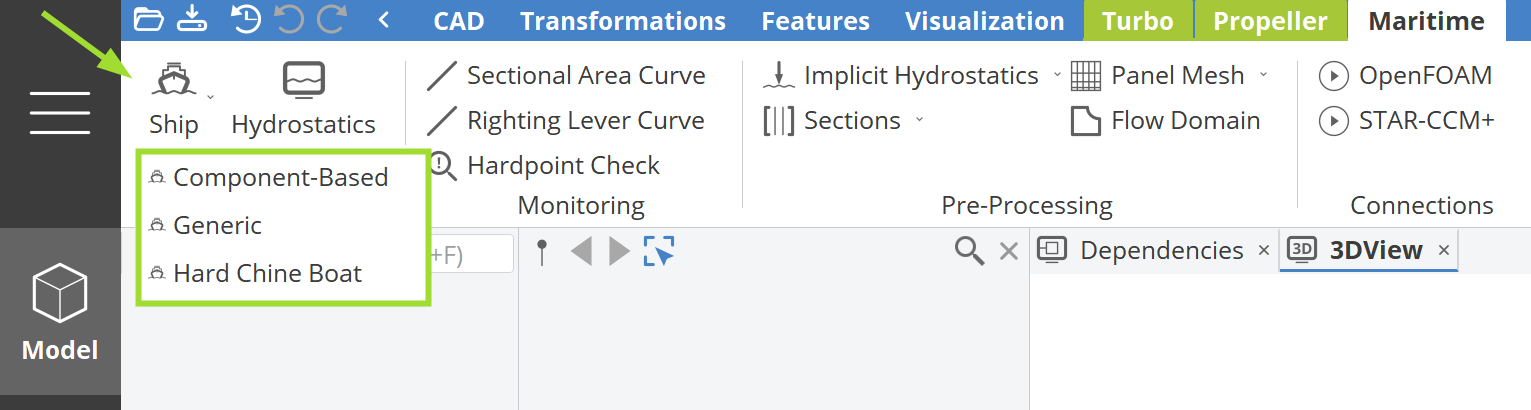
The button to access the Ship Object and to start the ship modeling workflow can be found in the Maritime tab (available under the Model workspace within the MaritimeThis functionality requires the Maritime add-on to be enabled. Add-On). Upon clicking, three options will appear:
- Component-Based: 5.3.0This functionality requires CAESES version 5.3.0 or later. A step-by-step modeling procedure that constructs a ship geometry using distinct components for the aftship, foreship, midship, skeg, bulb or appendage creation.
- Generic: An option that allows you to add your own ship geometry, either created as a parametric model in CAESES or imported from an external source.
- Hard Chine Boat: 5.4.0This functionality requires CAESES version 5.4.0 or later. A step-by-step modeling procedure for constructing a hard chine boat geometry using distinct components for the creation of the bare hull, spray rails or propeller tunnels.
You can replace the generated shapes and parameters with your custom ones by modifying either the Component-Based approach, the Hard Chine Boat approach or by using the Generic approach.
Ship Hull Components
The component-based ship hull workflow builds the full hull from individual parametric parts:
- Sweeping Foreship / Waterline-Based Foreship — bow geometry
- Buttock-Based Aftship / Section-Based Aftship — stern geometry
- Midship Section and Parallel Midship — hull form coefficients and displacement
- Basic Bulb — bulbous bow for wave resistance reduction
- Single Skeg / Twin Skeg — stern appendages
- Rudder — steering appendage geometry
Further Reading
- Hydrostatics — displacement, stability, and floating equilibrium calculations
- Generic Ship — wrap and parameterize an imported hull geometry
- Hull Morphing Tutorials — deform imported ship hull geometry without rebuilding a parametric model
Sample Models
Take a look at the ship sample models that are available with the Maritime Add-On and browse through ideas of how to set up your parametric model or use them as a starting point to kick-start your model setup.
Component-based Ship Samples
These ship samples are modeled with the component-based ship workflow.
Hard Chine Boat Sample
Additional Ship Samples
These ship samples are built from scratch and provide an idea of a simple ship hull setup.