Nested Features
CAESES gives you the possibility to use your existing feature definitions inside of other feature definitions. For example, if you have a complex mathematical function wrapped into a feature definition, you can use this function again within other feature definitions.
Those helper feature definitions can either be located in the project or they can be defined inside the Feature Definition itself. Nesting a feature definition inside of other feature definitions can be done on this tab of the Feature Editor. The advantage of defining such a "nested" Feature Definition is that the outer Feature Definition is self contained, i.e. it does not depend on the other Feature Definitions being present in the current project.
Additionally, nested Feature Definitions can be used to define custom commands for a Feature. A nested Feature Definition is available as a command from inside and outside of an instance of a Feature. The name of that command is the name of the nested Feature Definition, the arguments are those specified in the arguments of the nested Feature Definition, and the return type is defined by the accessible attributes of the nested Feature Definition. If multiple attributes are set to accessible, the return type is FObjectList, and a list will be returned that contains all accessible attributes in the order they are displayed on the attributes tab.
Features from the Current Project
Features that are inside the project are readily available as types and can be created inside any feature by using the fp_<name of the FFeatureDefinition> command:
// create an object using an existing feature definition

fp_myDefinition obj(<arguments>)
Assume we have a feature definition in your project for creating a custom line. This definition holds e.g. a length attribute of type FDouble. You would then create and use a feature of this definition as follows:
point a()
point b()

// ...

fp_myLine connection(a,b)

// access attributes of this feature definition

echo( "length = " + connection:length )
Fully Nested Features
You can also use feature definitions that are not within your project. Simply choose or create a definition from the tab "Feature Definitions":

Then use it as described above, by means of the fp_ syntax. For the line example from above, you would add and edit the nested feature (by clicking the edit button in the "Feature Definitions" tab) which would give you the following editor:
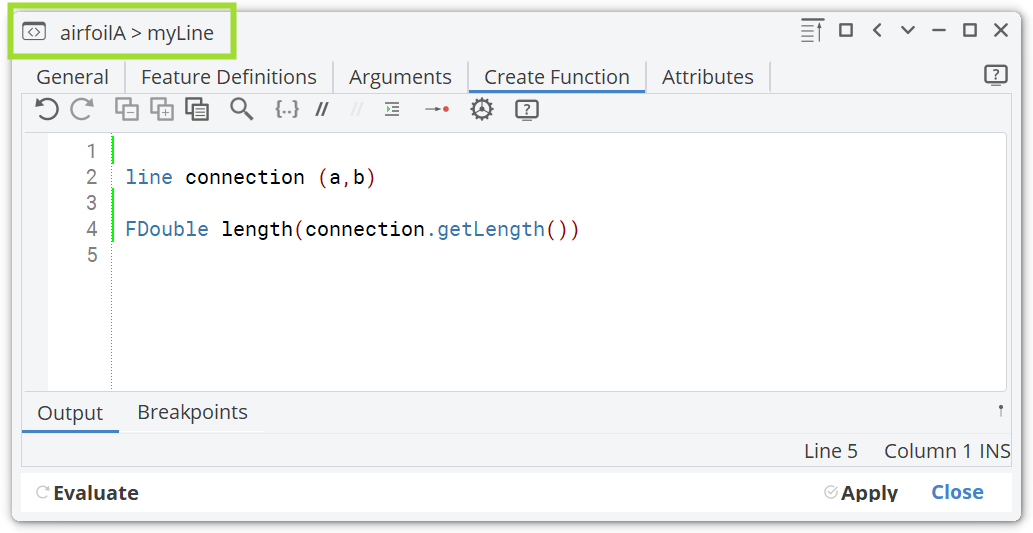
At the top of the window the nested structure is displayed. This nested feature does only exist within the parent feature definition "airfoilA". It is not available in the object tree node "Feature Definitions".