Custom Attributes
In some situations it can be handy to store some extra data (or meta data) at existing objects. You can create your own object attributes dynamically to read and write custom object data.
Key and Value
In order to set a custom attribute, you have to specify the key and a value. The key is a string identifier, while the value can be anything, e.g. float values, integers, strings, or even points, lines, curves etc.
Here is an example that stores an index for each generated line object and accesses it afterwards again:
bool setAsClient(false)
entitygroup curves()

loop (5)

  line c([0,0,0],[1,0,0])

  int  idx($$i)
  c.setCustomAttribute("index", $$i, setAsClient )

  curves.add(c)

endloop

// now iterate through the curve list and read the indices

loop(5)

    echo("index of curve = " + curves.at($$i).getCustomAttribute("index").castTo(FInteger))

endloop
index of curve = 0
index of curve = 1
index of curve = 2
index of curve = 3
index of curve = 4
Set as Client
As you can see in this small example, you can also specify whether the object is a client of the value that you set. For instance, if you set a curve as value and the curve gets modified, the object itself is out of date (and will possibly update itself automatically).
Casting
When you receive the value through the getter command getCustomAttribute(), you still need to convert it back to the specific type via the castTo() command. In the example from above, an integer value was stored so it gets casted by means of the basic type FInteger.
The reason for this is that the custom attribute has the type FObject which is the parent type of all objects in CAESES. By using this type as value, any type of value can be stored. Often you also see such a cast commando in the context of general lists (objectlist) where objects are stored, accessed and returned as FObject.
Pre-Defined Custom Attributes
There are a number of Custom Attribute available to apply some settings to certain objects.
FSC Export
For FFeatures you can set the following:
.setCustomAttribute("FSC Export", true): This will write feature.run() in the FSC file
.setCustomAttribute("FSC EXPORT META", "text"): This will write // FSC EXPORT META: text in the FSC file
Export Name
For objects which can be exported as IGES, SAT, STEP, PARASOLID you can set the export name:
.setCustomAttribute("ExportName", "myGeometry")
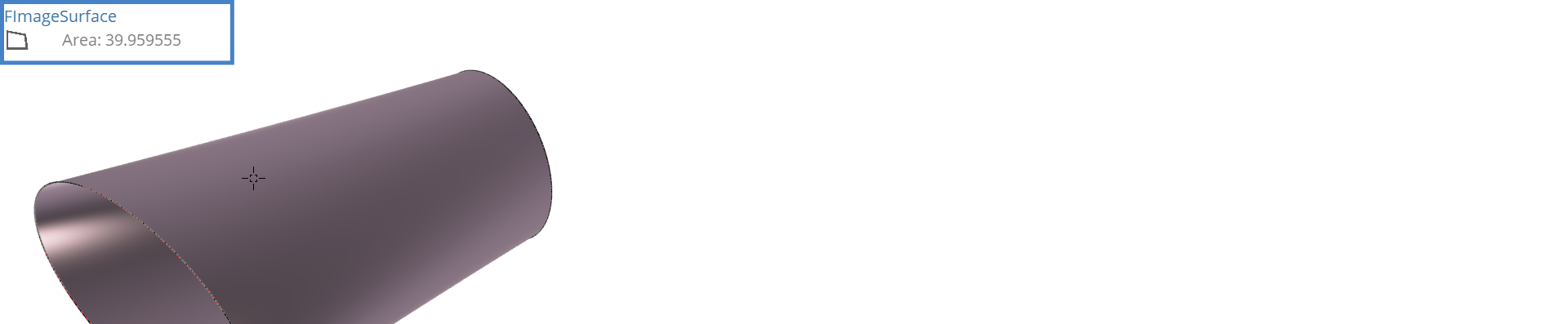
3D Tooltip
You can activate a tooltip of an object in the 3D Window by:
.setCustomAttribute("tooltip3d", "string")
Here an example:
.setCustomAttribute("tooltip3d", "Area: "+surface.getAreaApproximation())
Suppress Object Warning

If you want to hide warnings of an object, when it failed to create, you can suppress the warning by adding a custom attribute to the object. Simply select the object in the object tree and type in the console:
.setCustomAttribute("suppress_warnings")