Deformation of an Imported Ship Hull
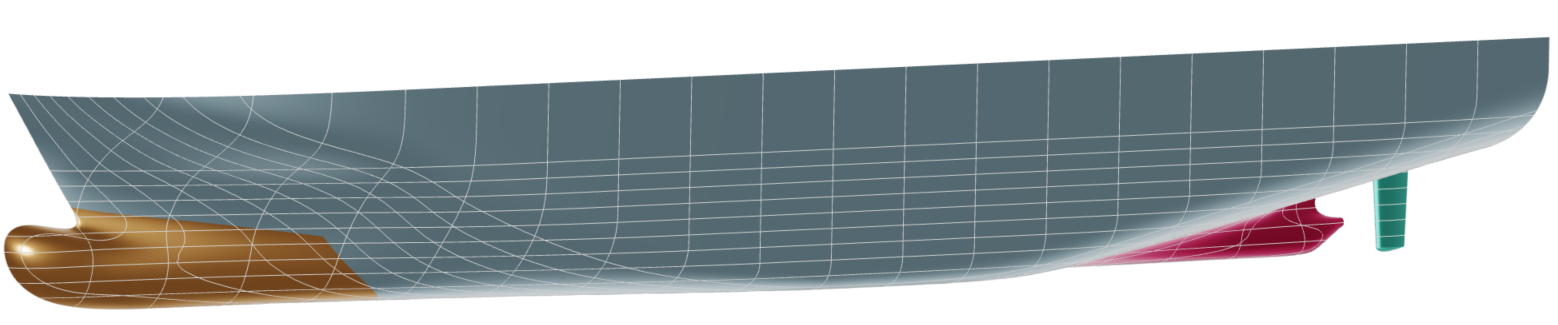
In this tutorial, partially-parametric modeling (also referred to as morphing in CAESES) of a ship hull will be introduced. Various methods for the deformation a ship hull inside CAESES are presented:
Introduction
As a starting point, a ship hull designed by FRIENDSHIP SYSTEMS is provided in STEP file format. This hull model will be used for modification in this tutorial.
The concept of partially-parametric modeling (PPM) is to have an existing geometry and deform it, unlike fully-parametric modeling (FPM), in which the model is defined and designed from scratch. Implementing such changes with traditional CAD tools can be challenging, but this tutorial will demonstrate how easy and robust it is to set up these complex alterations within CAESES.
Naturally, the settings shown in this tutorial represent just one possible configuration and can be adjusted by the users to suit their preferences.
Import
Initially, save the STEP file we will use as a starting geometry and import it in CAESES.
Save hull STEP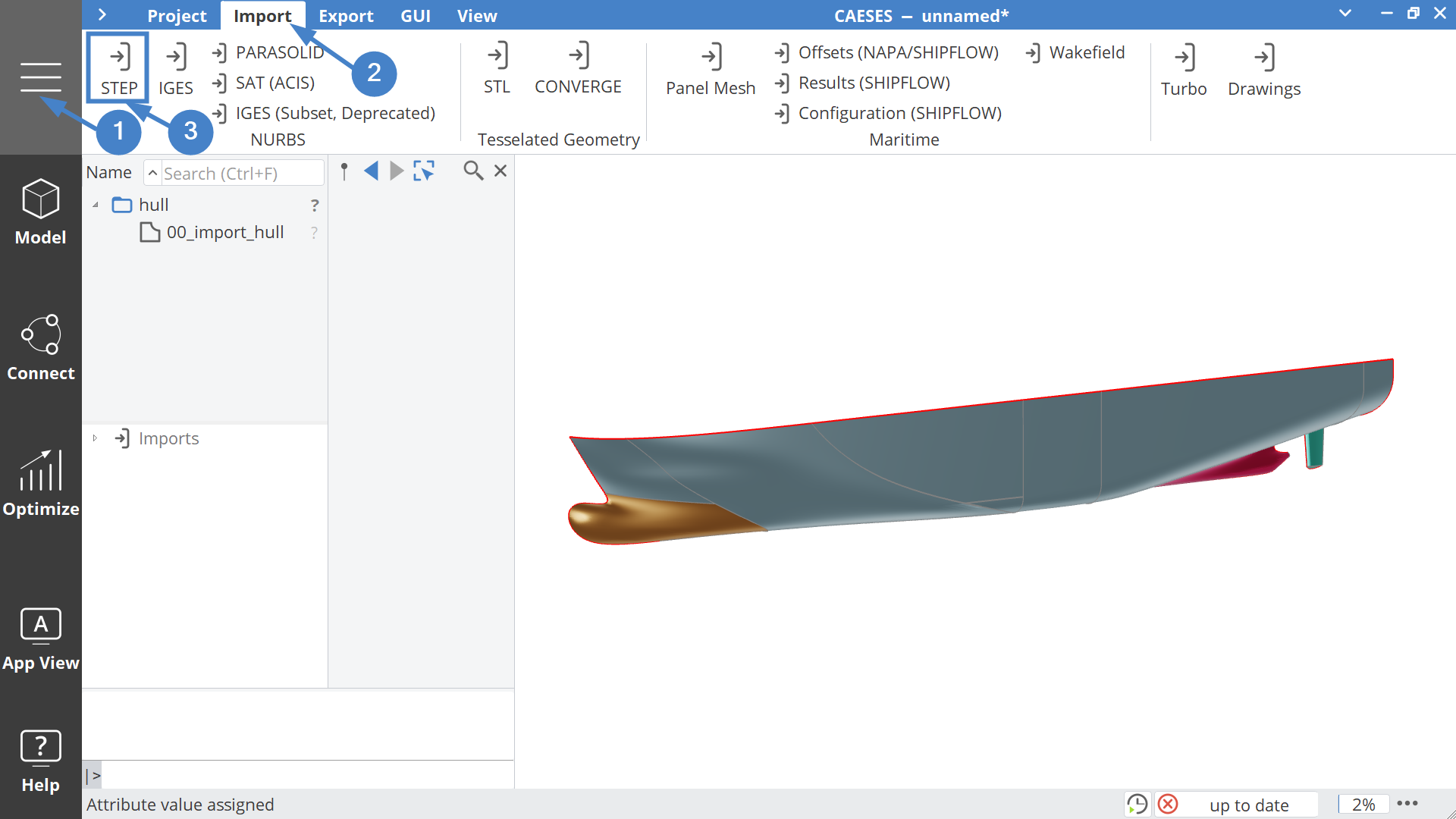
The imported hull can be renamed to "hull" and be placed under the |00_import| scope.
Curves
From the imported hull, Image curves are used for capturing the bulbContour and knuckle under the scope |00_import|00_curves| with the following Sources and Domain:
Knuckle Curve
- Create an Image Curve and name it "knuckle".
- Set the Source to
|00_import|hull.getEdge(40)
Bulb Contour Curve
- Create another Image Curve and name it "bulbContour".
- Set the Source to
|00_import|hull.getEdge(41) - Set the Domain to
[1,0]
The bulbContour curve was reversed ([1,0]) by flipping the domain, in order to be used properly later. This switches the start and endpoint of the curve.
Dimensions
Then, the basic dimensions of the imported hull are calculated and their values are assigned to the corresponding Parameters, placed in the scope |00_import|00_dimensions| with the following expressions:
Create 5 Parameters and name them "beam", "depth", "tFlatbar", "xMax" and "xMin".
Set the Parameter values as:
| Parameter Name | Parameter Value |
|---|---|
| beam | |00_import|hull.getMax():Y * 2 |
| depth | |00_import|hull.getMax():Z |
| tFlatbar | |00_import|00_curves|bulbContour.getMin():Y |
| xMax | |00_import|hull.getMax():X |
| xMin | |00_import|hull.getMin():X |
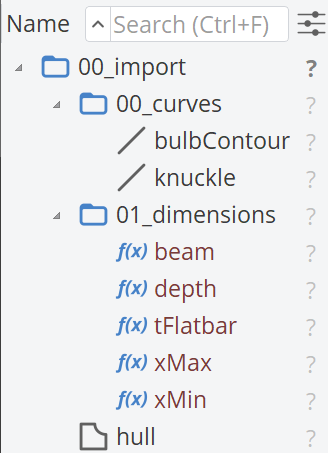
The final structure of the |00_import| scope should look like this.
Bulb
Now, we will begin modifying the ship model, starting with the bulb region, which is crucial in the maritime industry. A new scope named |01_bulb| will be created. Two different modifications will be applied to the bulb: one for its length and the other for its height. Therefore, two design variables named length and height will be created, each ranging from -1 to 1. For each transformation, a different sub-scope will be created: |01_bulb|00_length| and |01_bulb|01_height|, where the corresponding design variables will be placed.
Length
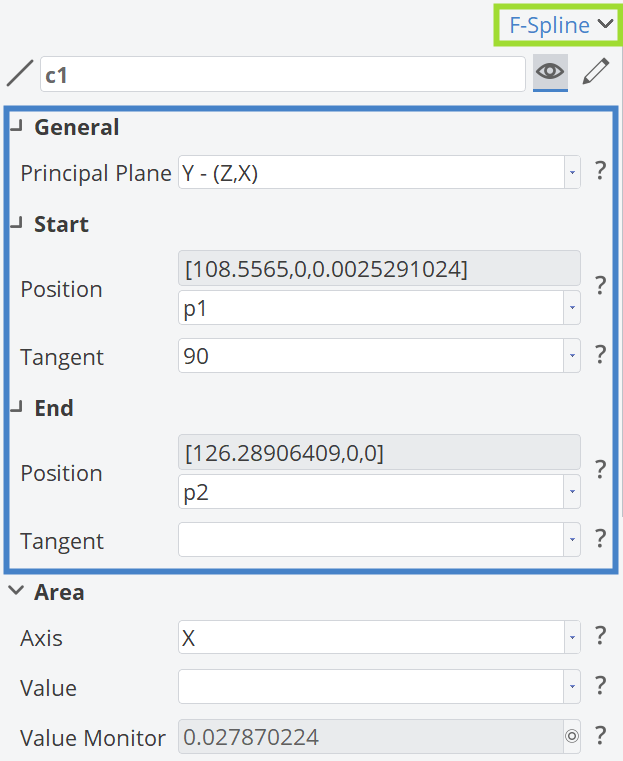
To adjust the length of the bulb, we will use a Delta Shift transformation, utilizing an F-Spline curve for the transformation. The starting point and the ending point, p1 and p2, are defined as follows:
| Coordinates | p1 | p2 |
|---|---|---|
| X | |00_import|00_curves|bulbContour:Start:X | 126.3 |
| Y | 0 | 0 |
| Z | |00_import|00_curves|bulbContour:Start:Z | |01_bulb|01_length|length |
Then the F-Spline and the corresponding points will be placed under the scope |01_bulb|00_length|deltaShift|curve|, c1, is defined as illustrated in the figure below:
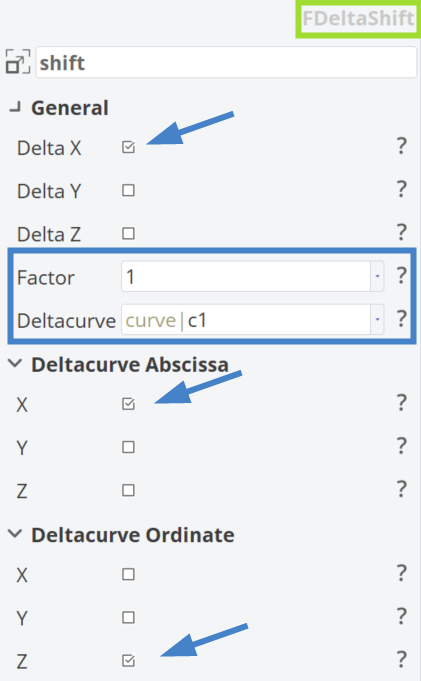
For the Delta Shift, we initially need to define the shifting direction (Delta X). Then, we define the curve that will apply the transformation (Delta curve) and the factor, which determines what percentage of the transformation will be applied, with 1 meaning 100% of the transformation. Additionally, it is necessary to define for the DeltaCurve which direction is abscissa and which one is ordinate. In our case, it is X and Z, respectively.
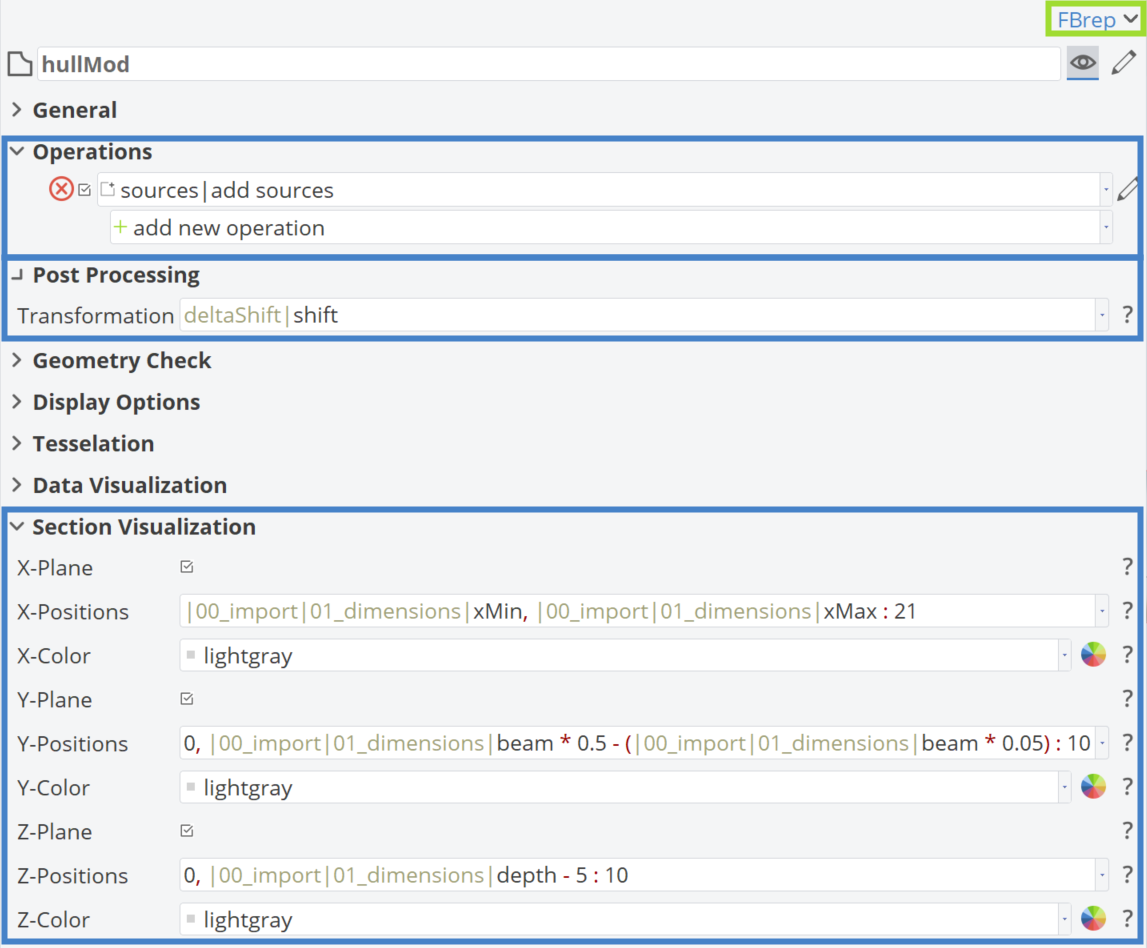
Finally, the modified BRep related to the length of the bulb is named hullMod. Under "Add Sources", the imported hull is placed and in "Post Processing", the "deltaShift|shift" transformation is added, as shown in the figure below. Additionally, the process for enabling Section Visualization is demonstrated.
Height
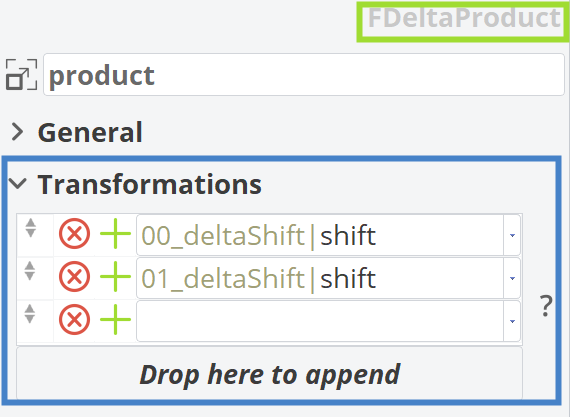
The modifications to the height of the bulb will be applied using a Delta Product transformation. This transformation is employed to control the deformation of the hull model along the vertical axis, ensuring that the deck curve remains unchanged. Its primary purpose is to adjust the bulb region. The Delta Product used here is a multiplication of two Delta Shift transformations (|00_deltaShift|shift and |01_deltaShift|shift).
First Delta Shift
For the first delta shift (|00_deltaShift|shift), an F-Spline curve like in the Length Section before will be used. The starting point and the ending point, p1 and p2, are defined as follows:
| Coordinates | p1 | p2 |
|---|---|---|
| X | |01_bulb|00_length|deltaShift|curve|p1:X | |01_bulb|00_length|deltaShift|curve|p2:X |
| Y | 0 | 0 |
| Z | |01_bulb|00_length|deltaShift|curve|p1:X | |01_bulb|01_height|height |
Other aspects will remain similar to the Length F-Spline curve.
Second Delta Shift
Let's create the second delta shift curve (|01_deltaShift|).
Under the scope of |01_deltaShift|curve|, three points are created:
| Coordinates | p1 | p2 | p3 |
|---|---|---|---|
| X | 0 | 0 | 0 |
| Y | 1 | 1 | 0 |
| Z | 0 | |00_import|00_curves|bulbContour:End:Z | |00_import|01_dimensions|depth |
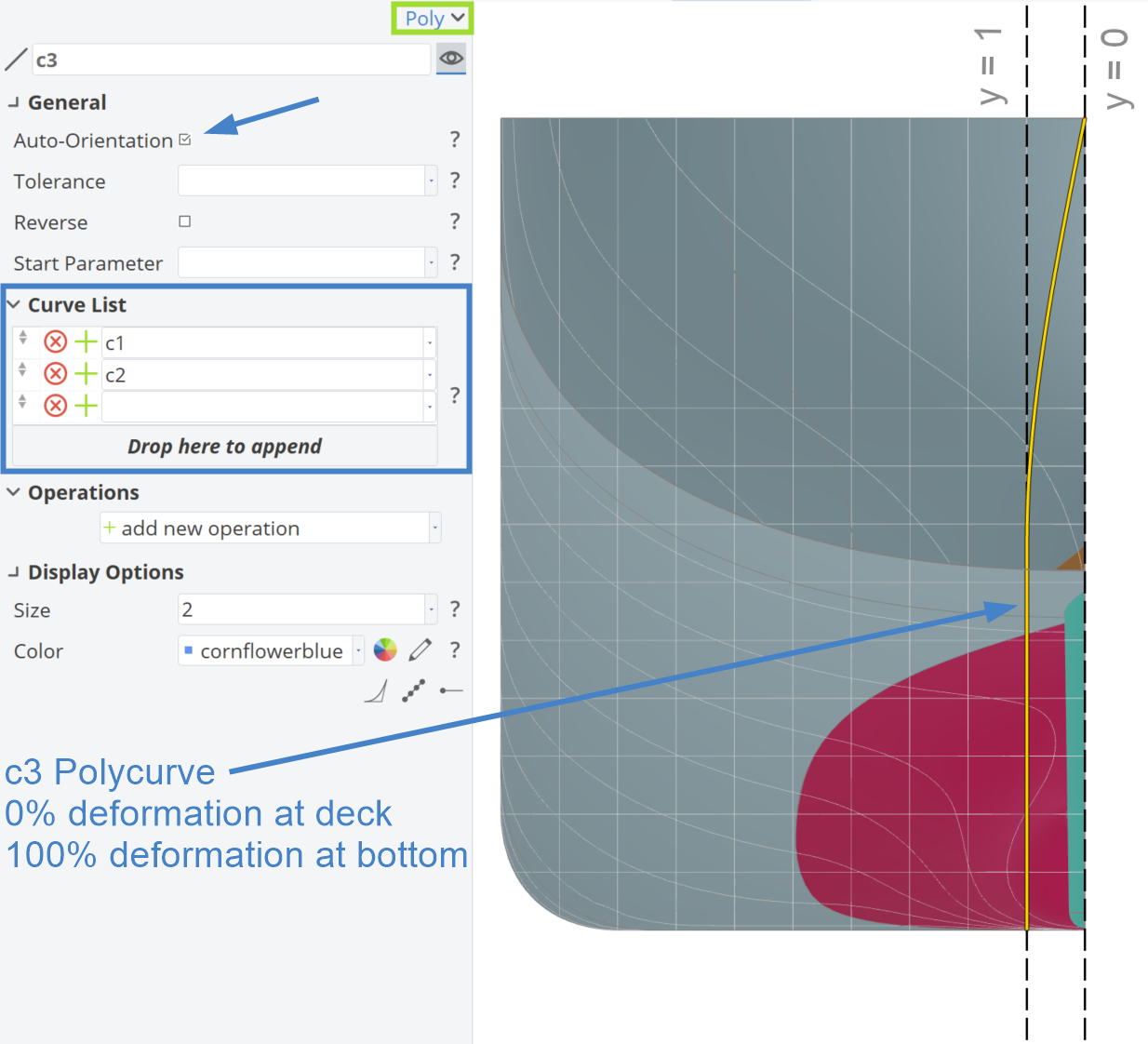
Then, in the same scope, we create a Line c1 between Points p1 and p2, and an F-Spline c2 with the following properties:
- Start:Position: p2
- Start:Tangent: 90 degrees
- End:Position: p3
- Principal Plane: X - (Y,Z)
Finally, we generate a Polycurve c3 using Curves c1 and c2. The Polycurve c3 will have a value of 1 at the ordinate and will smoothly fade to 0 at the end of the curve. This means that, at the beginning, the |00_deltaShift|shift transformation will be applied 100% close to the bottom of the hull, while near the deck, the transformation will have no effect. This Polycurve will be used for the |01_deltaShift|shift in order to be used for the |deltaProduct|product.
Combine Delta Shifts in Delta Product
With the two Delta Shifts set up, we can now define the |deltaProduct|product.
Finally, a hullMod BRep is generated. The |deltaProduct|product is then applied and |00_deltaShift|hullMod is added as a source.
Animating Transformations
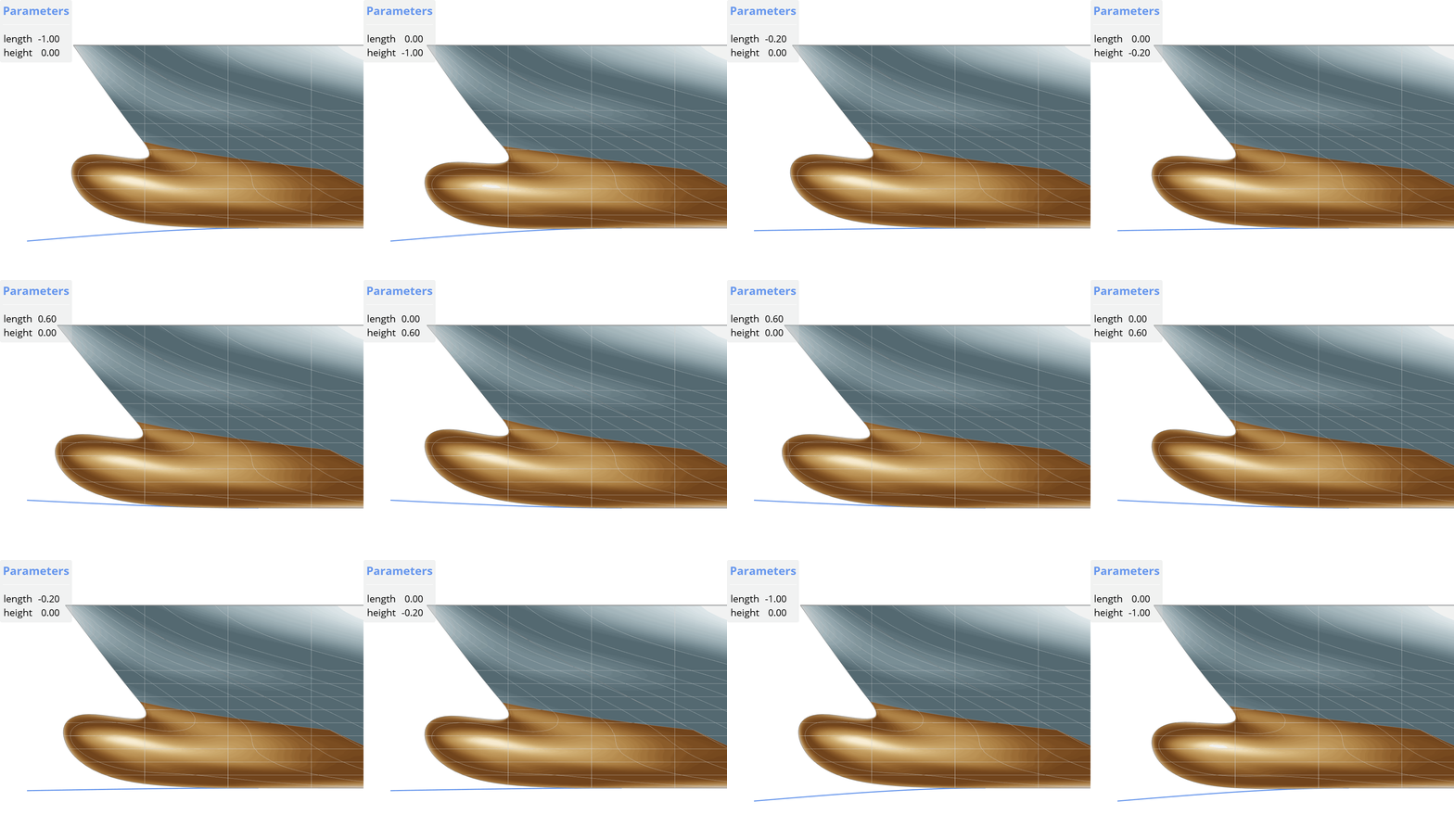
In the animation below, we can see the impact of the design variables |01_bub|01_length|length and |01_bub|02_height|height| on the bulb region and how changing curves can impact through Delta Shift (left) and Delta Product (right).
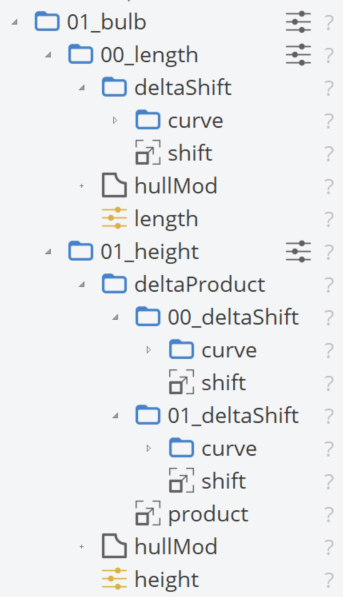
Scope Structure
The final scope structure of the |01_bulb| scope should look like this.
Forward Shoulder
If you modify the bulb, you may also want to adjust the forward (fwd) shoulder to optimize the interference of the generated waves and reduce resistance. This adjustment can help make the shape fuller or more slender, depending on your needs, using a Surface Delta Shift. Therefore, a new scope named |02_fwdShoulder| will be created. The design variable that will control this transformation is |02_fwdShoulder|delta, ranging from -0.5 to 0.5.
For your convenience, the B-Spline surface for the deformation is provided for download and needs to be imported as a STEP file. The control points of the imported B-Spline surface are shown below within the blue rectangle.
Download Surface STEP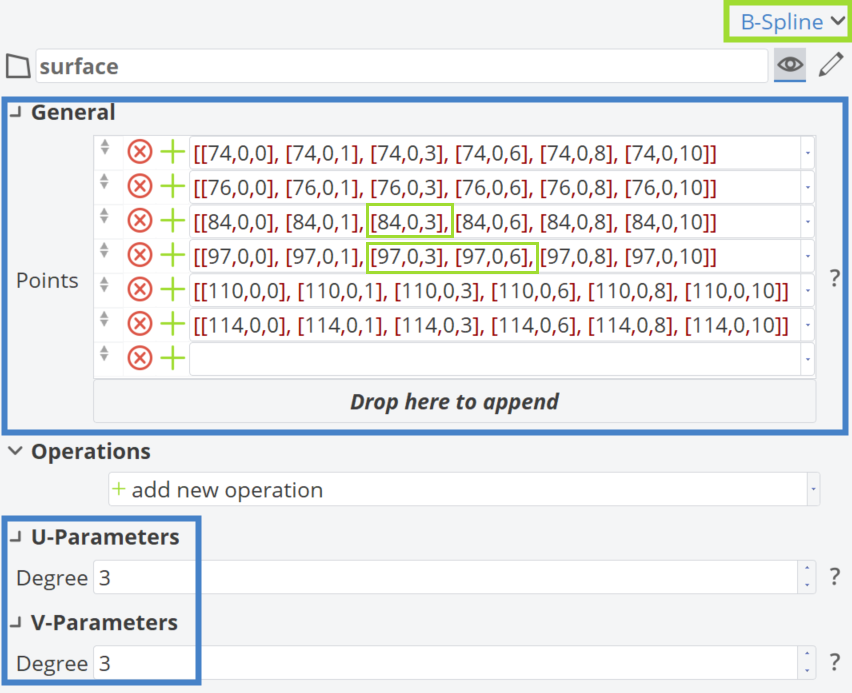
Next, modifications should be made to the control points within the green rectangles in the figure above. By changing the |02_fwdShoulder|delta parameter, the surface should adjust accordingly.
| Points |
|---|
[[74,0,0], [74,0,1], [74,0,3], [74,0,6], [74,0,8], [74,0,10]] |
[[76,0,0], [76,0,1], [76,0,3], [76,0,6], [76,0,8], [76,0,10]] |
[[84,0,0], [84,0,1], [84,1.2 * |02_fwdShoulder|delta, 3], [84,0,6], [84,0,8], [84,0,10]] |
[[97,0,0], [97,0,1], [97,2 * |02_fwdShoulder|delta, 3], [97,0.8 * |02_fwdShoulder|delta, 6], [97,0,8], [97,0,10]] |
[[110,0,0], [110,0,1], [110,0,3], [110,0,6], [110,0,8], [110,0,10]] |
[[114,0,0], [114,0,1], [114,0,3], [114,0,6], [114,0,8], [114,0,10]] |
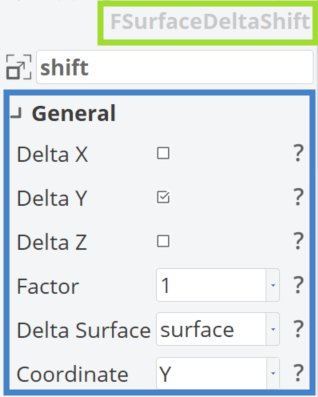
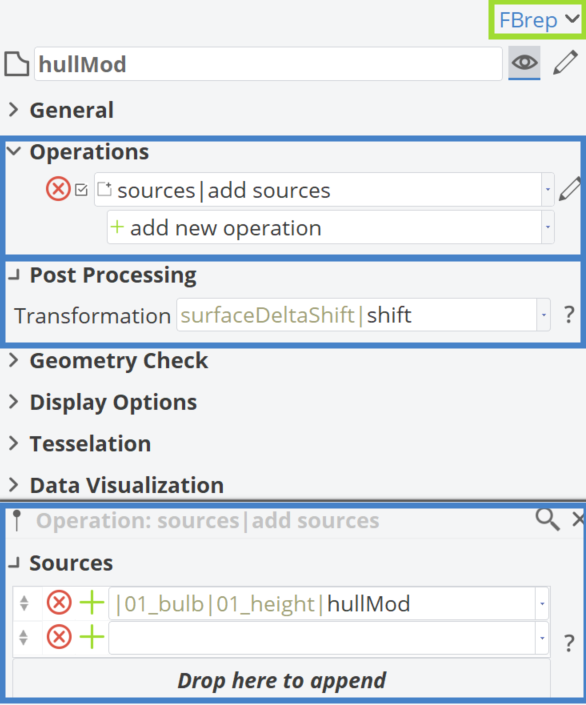
The Surface Delta Shift transformation (|02_fwdShoulder|surfaceDeltaShift|shift) is then applied, as illustrated below.
In the following figure, the BRep hullMod is defined.
Animating Transformations
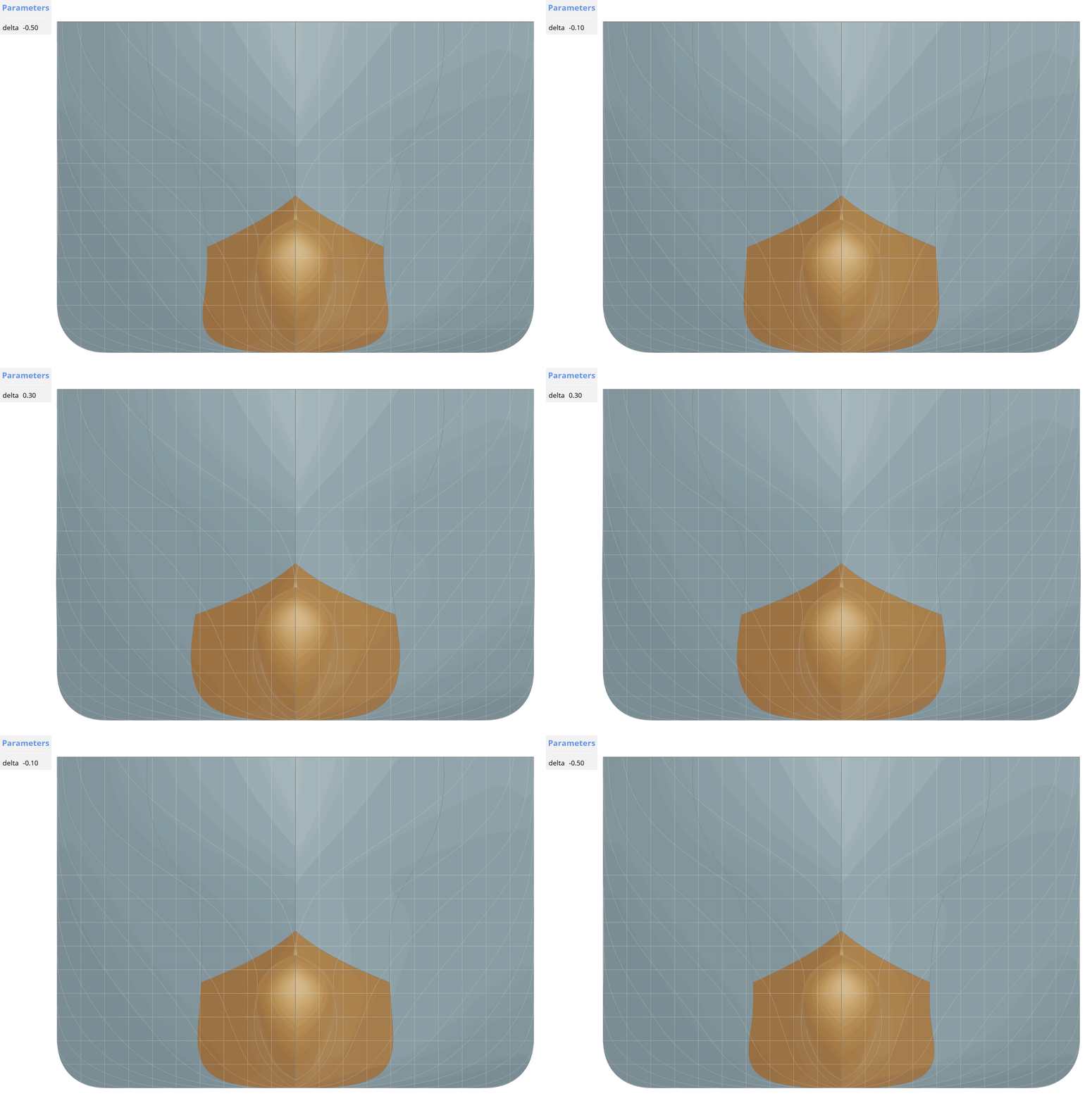
In the animations below, the impact of the Delta Product and the design variable |02_fwdShoulder|delta is shown.
Scope Structure
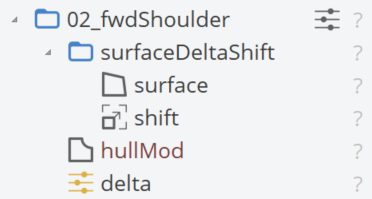
The final structure of the |02_fwdShoulder| scope should look like this.
Mid Frame
Afterward, significant modifications, such as changing the deadrise angle, raising the flat of the bottom to an angle or tilting the sides by introducing a flare angle, can be made. For these modifications, a new scope |03_midFrame| will be created, along with two new sub-scopes named |03_midFrame|00_deadrise| and |03_midFrame|01_flare|. Each sub-scope contains the corresponding design variables deadrise and flare, ranging from 0 to 1. A Delta Product will be applied for both transformations.
Deadrise
For the deadrise angle deformation, three different Delta Shifts will be combined, resulting in three corresponding sub-scopes: |deltaProduct|00_deltaShift|, |deltaProduct|01_deltaShift| and |deltaProduct|02_deltaShift|. The first sub-scope applies the deadrise angle deformation, the second one controls the effect of the deformation in the vertical axis—0% at the deck and 100% at the bottom, similar to the previous sections. Finally, the third sub-scope defines the effect of the transformation in the longitudinal direction, with 200% impact at the midship, gradually fading to 0% at the aft and forward parts of the ship.
|00_deltaShift|
For the transformation |00_deltaShift|shift, a line named ln will be used with the following properties:
- Start Position: [0, |00_import|01_dimensions|tFlatbar, 0]
- End Position: [0, |00_import|01_dimensions|beam * 0.6 + |00_import|01_dimensions|tFlatbar, tan(|03_midFrame|00_deadrise|deadrise) * |00_import|01_dimensions|beam * 0.6]
The properties of the |00_deltaShift|shift are shown below:
- Delta Z: ✔️
- Factor: 1
- Deltacurve: ln
- Deltacurve Abscissa: Y
- Deltacurve Ordinate: Z
|01_deltaShift|
For the transformation |01_deltaShift|shift, an Image curve named c1 will be used by adding a Curve Extension Operation and with the following properties:
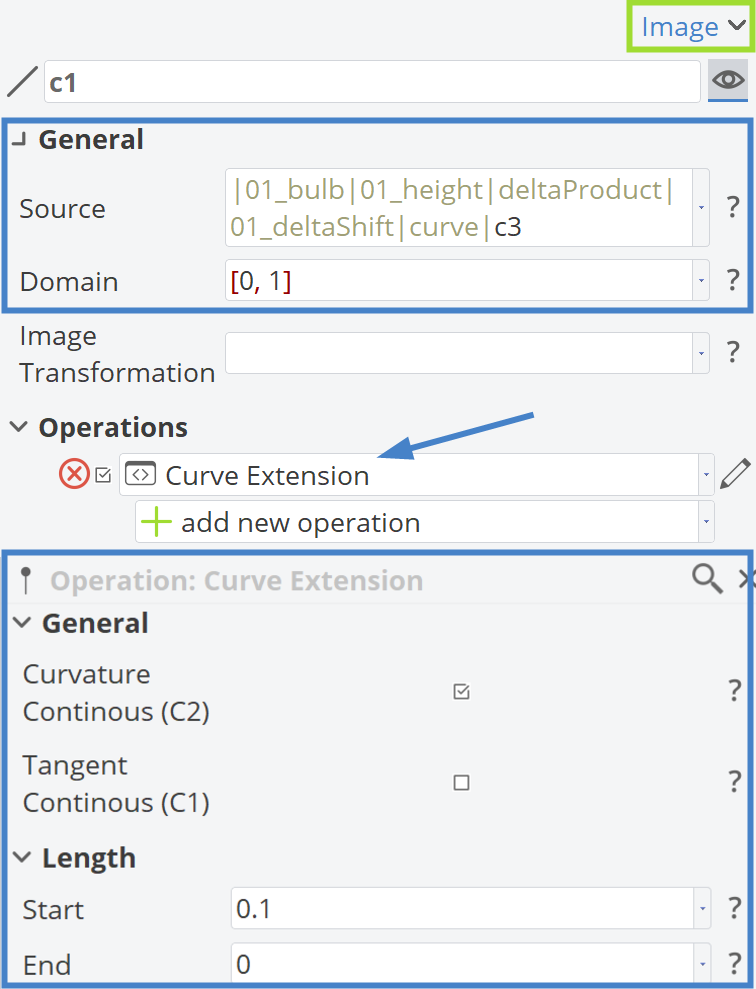
The properties of the |01_deltaShift|shift are shown below:
- Delta Z: ✔️
- Factor: 1
- Deltacurve: c1
- Deltacurve Abscissa: Z
- Deltacurve Ordinate: Y
|02_deltaShift|
For the transformation |02_deltaShift|shift, a 3rd-degree B-Spline curve named c1 will be used with the following control points:
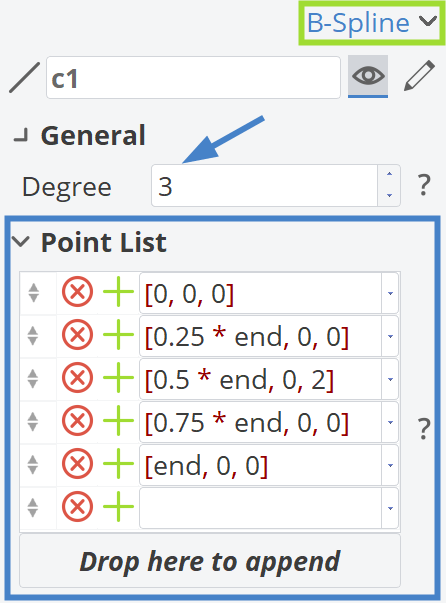
The end parameter is defined in this sub-scope with the following expression: end = |00_import|00_curves|bulbContour:End:X.
The properties of the |02_deltaShift|shift are shown below:
- Delta Z: ✔️
- Factor: 1
- Deltacurve: c1
- Deltacurve Abscissa: X
- Deltacurve Ordinate: Z
|deltaProduct|
Finally, the |deltaProduct|product is defined and applied to a new hullMod BRep, similar to the previous transformations. The |02_fwdShoulder|hullMod is then added as a source to this BRep.
Flare
For the flare angle deformation, two different Delta Shifts will be combined, resulting in two corresponding sub-scopes: |deltaProduct|00_deltaShift| and |deltaProduct|01_deltaShift|.
|00_deltaShift|
For the transformation |00_deltaShift|shift, a line named ln will be used with the following properties:
- Start Position: [0, 0, |00_import|01_dimensions|depth]
- End Position: [0, -tan(|03_midFrame|01_flare|flare) * (|00_import|01_dimensions|depth + 1), -1]
The properties of the |00_deltaShift|shift are shown below:
- Delta Y: ✔️
- Factor: 1
- Deltacurve: ln
- Deltacurve Abscissa: Z
- Deltacurve Ordinate: Y
|01_deltaShift|
For the transformation |01_deltaShift|shift, a line named ln will be used with the following properties:
- Start Position: [0, |00_import|01_dimensions|tFlatbar, 0]
- End Position: [0, |00_import|01_dimensions|beam * 0.6 + |00_import|01_dimensions|tFlatbar, 1.2]
The properties of the |01_deltaShift|shift are shown below:
- Delta Y: ✔️
- Factor: 1
- Deltacurve: ln
- Deltacurve Abscissa: Y
- Deltacurve Ordinate: Z
|deltaProduct|
Similarly to the deadrise angle transformation, the |deltaProduct|product is defined and applied to a new hullMod BRep. The |03_midFrame|hullMod is then added as a source to this BRep.
Animating Transformations
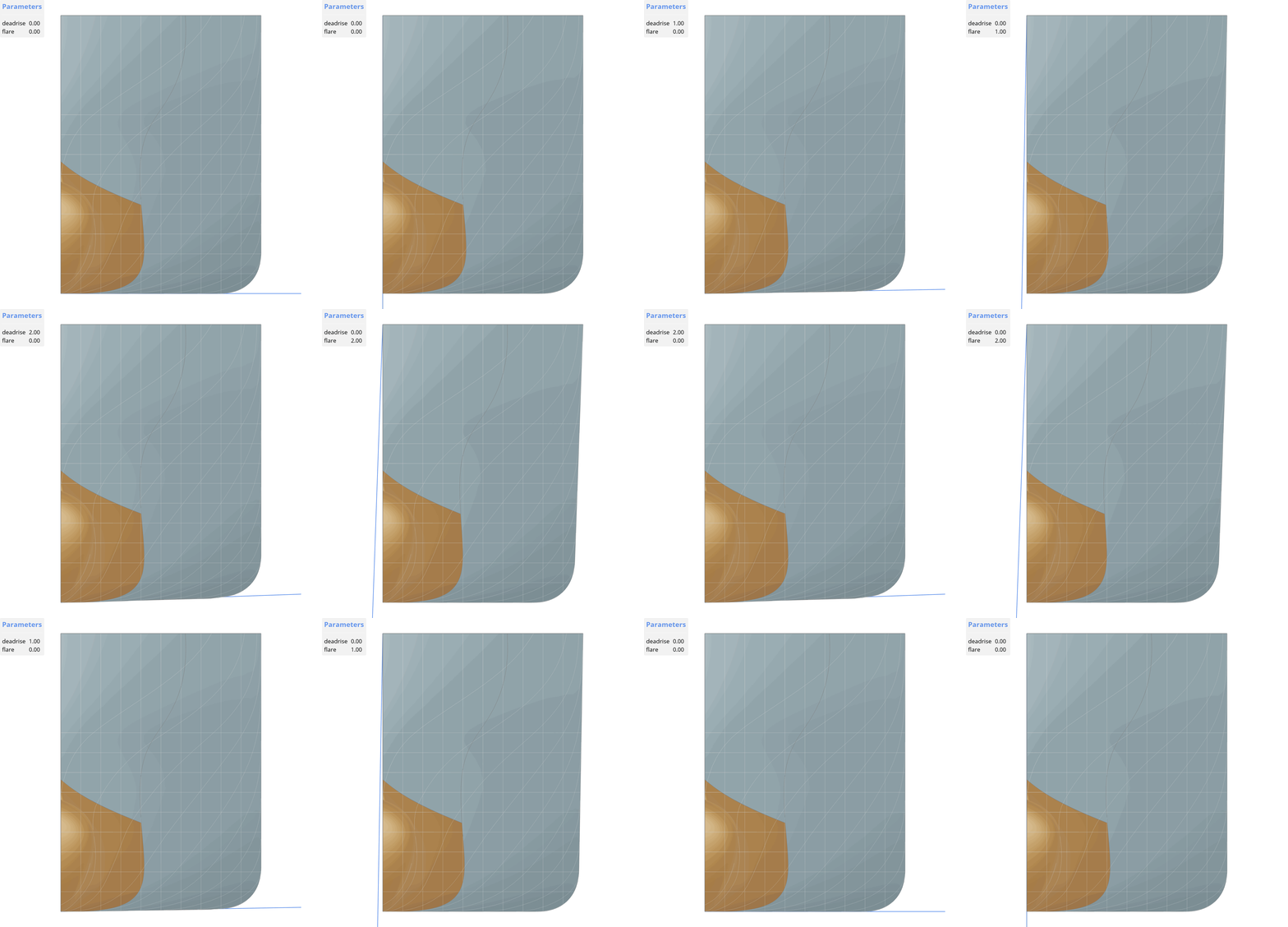
In the animations below, the impact of the two aforementioned Delta Products and the design variables |03_midFrame|deadrise and |03_midFrame|flare is demonstrated.
Scope Structure
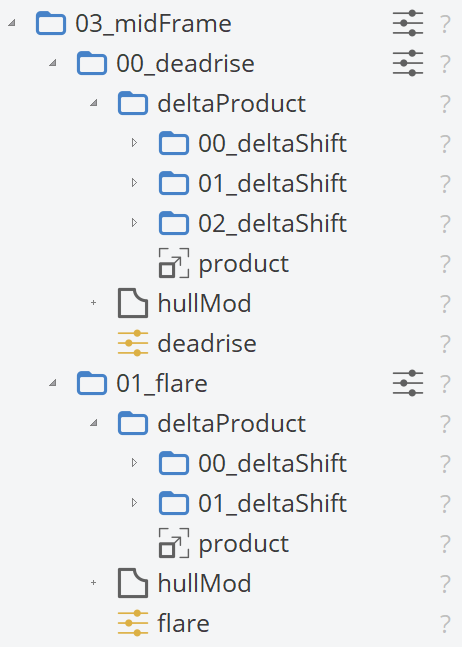
The final structure of the |03_midFrame| scope should look like this.
Combined Transformations
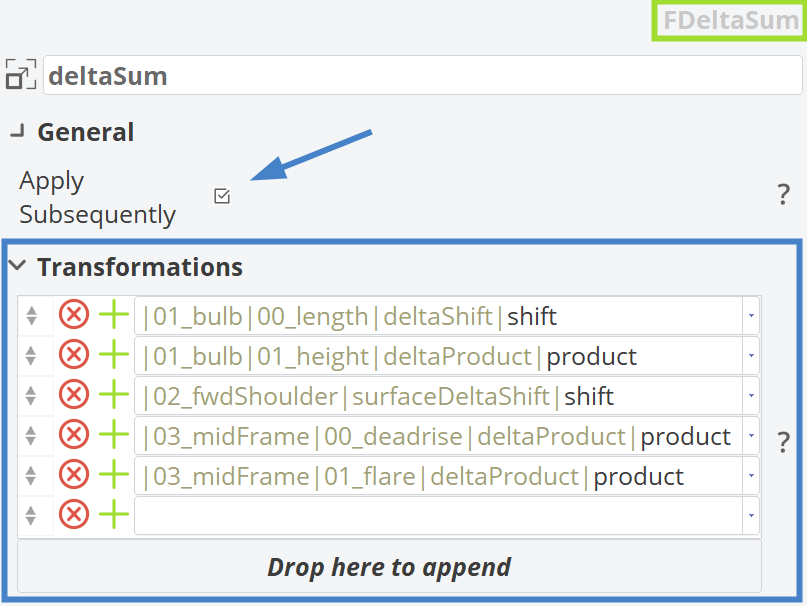
A new scope named |04_combinedTransformations| is created. In this scope, no new transformations are introduced; instead, existing Delta transformations are summarized using Delta Sum. This allows all the aforementioned transformations to be applied in a transformation chain by checking the box shown in the figure below. Note that the result depends on the order of the transformations.
Afterward, a new hullMod BRep is created and |04_combinedTransformations|deltaSum is applied. The |00_import|hull is then added as a source to this BRep.
Skeg Tunnel
At this point, we have finished describing the Delta transformations in this tutorial. Now, we will focus on BRep Morphing techniques, which were first introduced in CAESES 5. One area of interest for morphing is often the skeg tunnel of a ship. We will create a new scope named |10_skegTunnel| with a design variable controlling the morphing, tunnelMatch, ranging from -0.5 to 1.5.
Curves
BRep morphing in CAESES requires both source geometry (points, curves or surfaces) and target geometry (points, curves or surfaces). In ship design, working with curves has proven effective, so this tutorial will use curves for BRep morphing by creating a new sub-scope |10_skegTunnel|00_curves|.
Source
The source is simply an Image curve defined as follows:
- Source: |04_transformationsCombined|hullMod.getEdge(3)
- Domain: [0,1]
Additionally, a 3D Point named p is defined, which can be slightly adjusted based on user preference. This 3D Point will help generate the target curve.
- X: 6
- Y: 0
- Z: 3.5
Target
The target curve is an Image curve derived from the source, but with additional operations to differentiate it. These operations are selected to create a smooth curve while maintaining the same start and end points as the source curve.
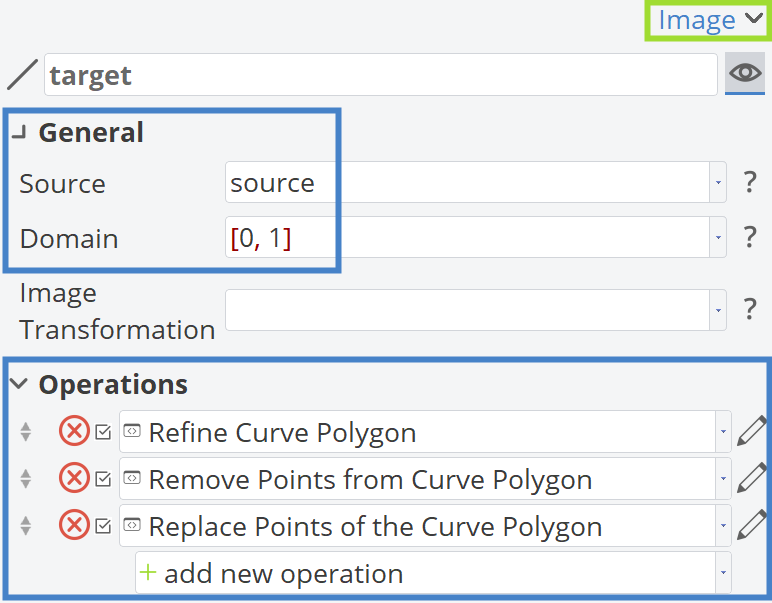
The added operations are shown in detail in the figure below.

BRep Morphing
Now that we have set up the source and the target curve, we will proceed to set up the BRep morph by creating a new sub-scope |10_skegTunnel|01_BRepMorph|.
Constraints in Y-direction
To achieve smooth morphing, some constraints in the Y-direction will be applied. Essentially, we want to create the Ruled surface s shown below, which is generated by Curves c1 and c2.
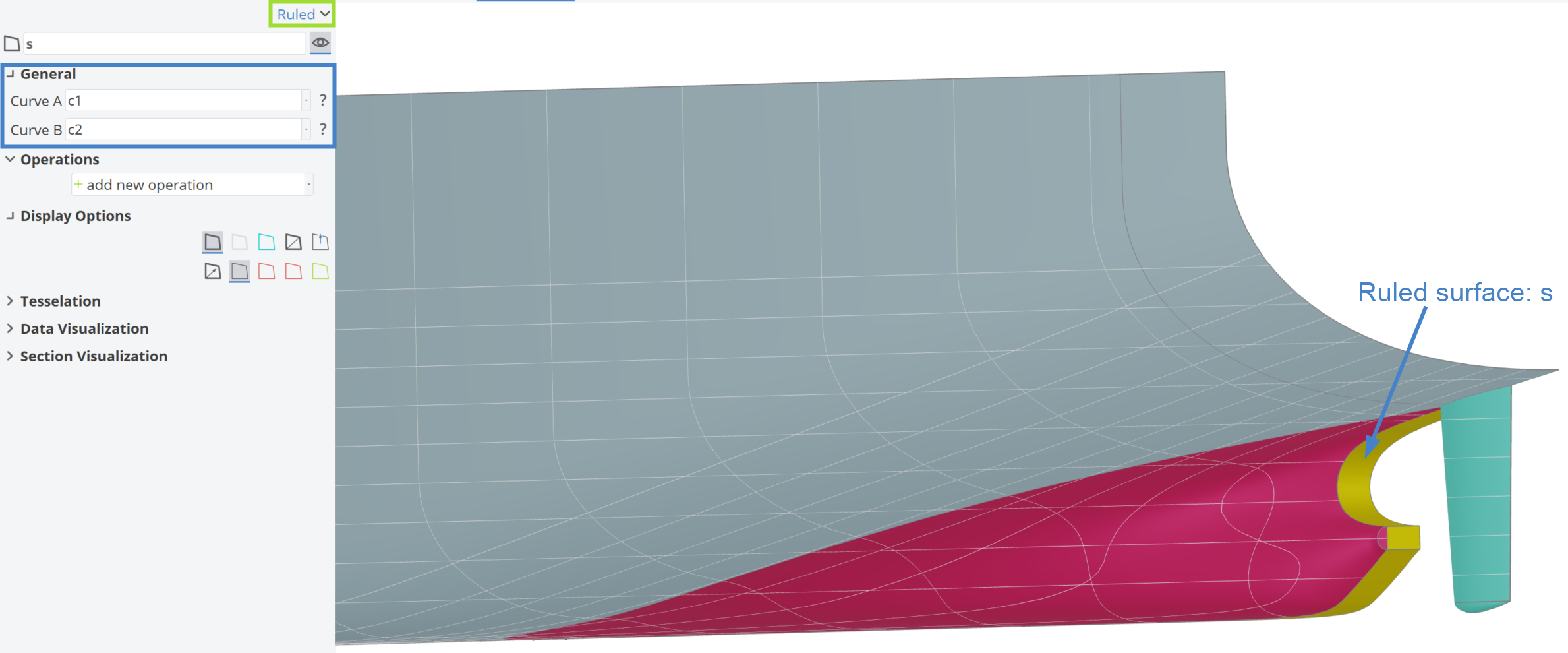
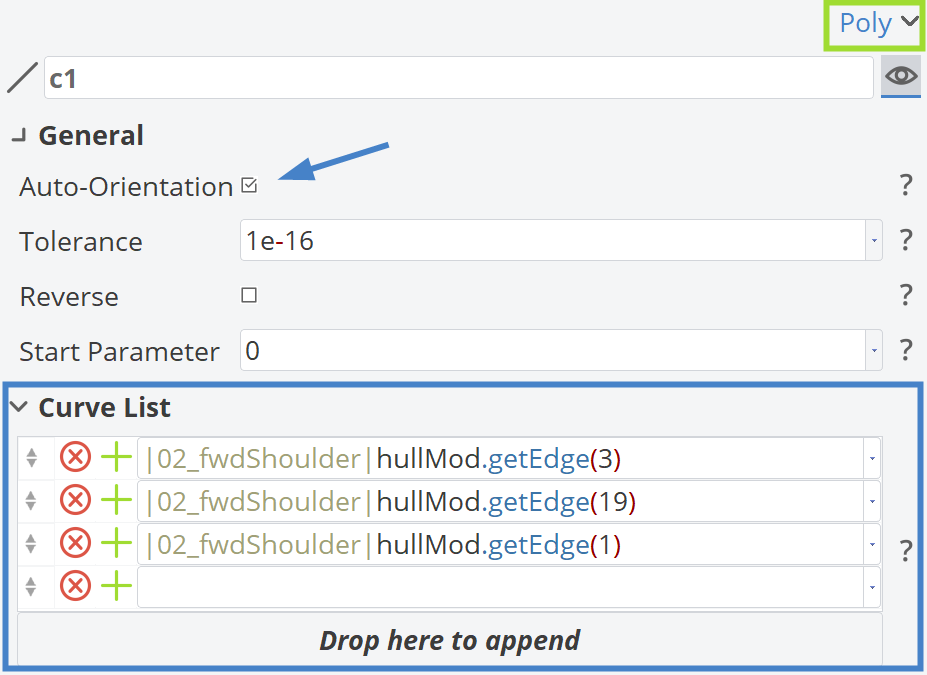
The c1 is a Polycurve and is defined as follows:
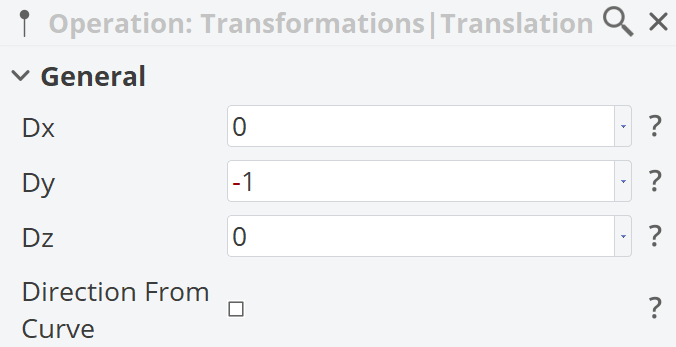
The c2 is an Image curve of c1, with an added Operation: Transformations|Translations.
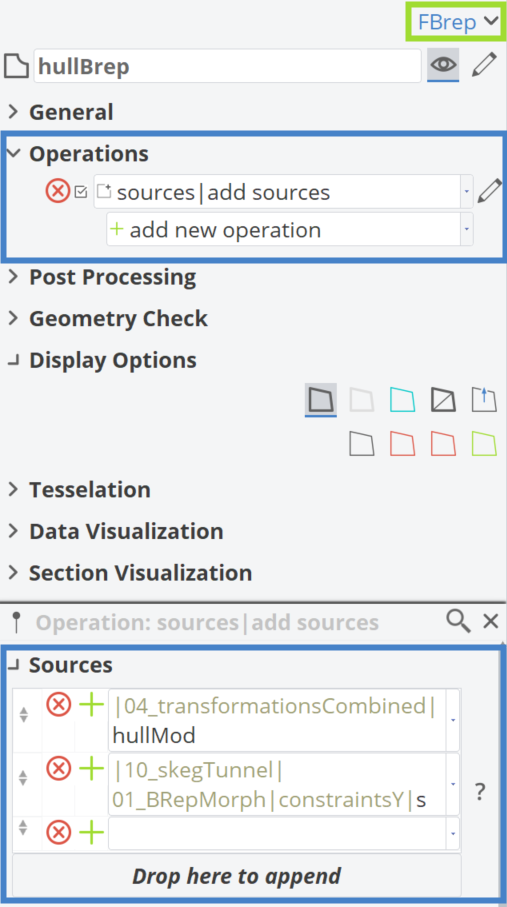
In the following sequence, it is shown how the |04_transformationsCombined|hullMod| and the Ruled surface s are merged into a single BRep named hullBRep.
Setup BRep Morphing
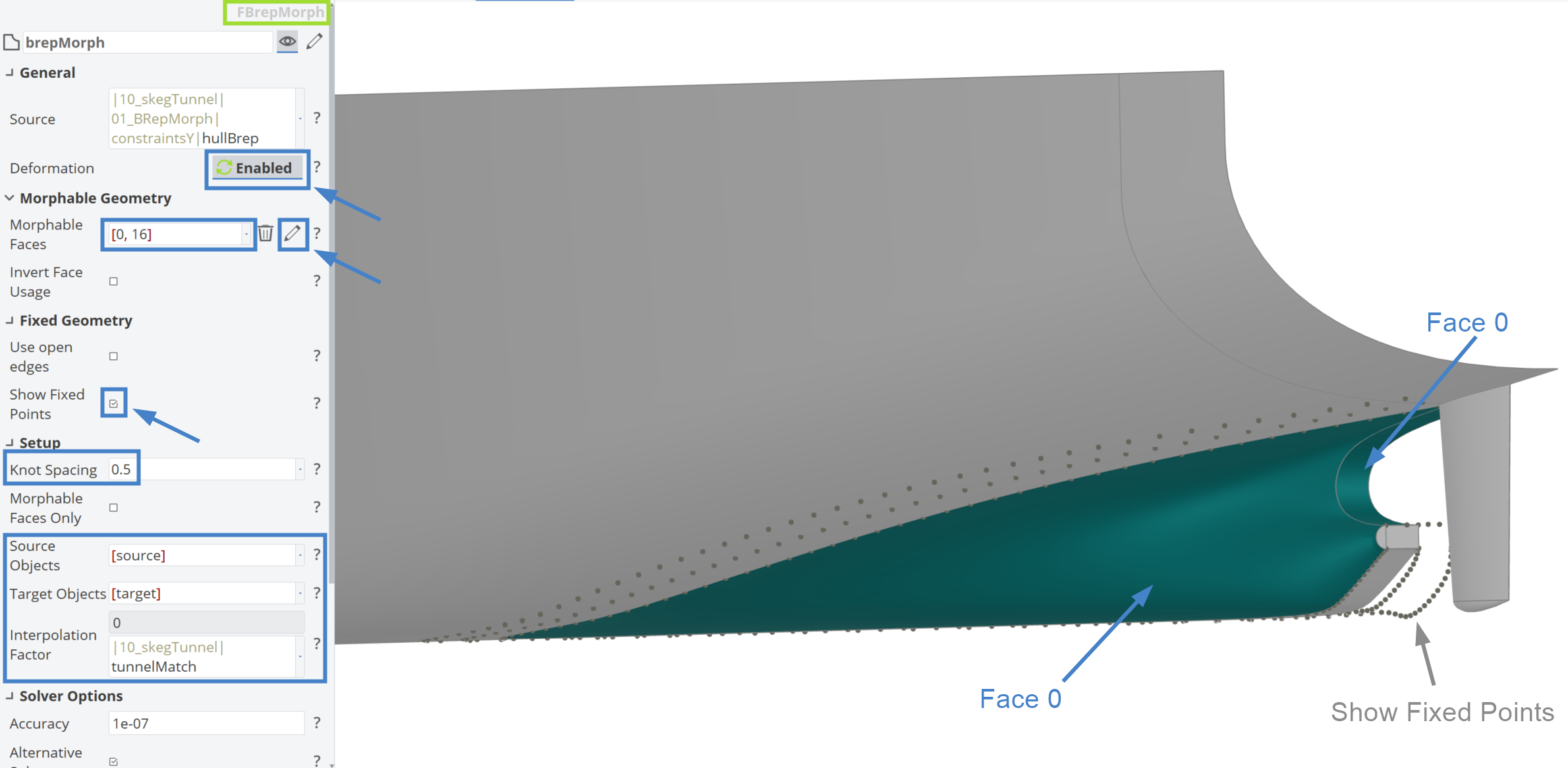
The BRep morphing setup is shown by adding hullBRep as the source and selecting the Morphable Faces as [0,16]. The Show Fixed Points option is enabled and the Knot Spacing is set to 0.5. The design variable |10_skegTunnel|tunnelMatch is also set as the Interpolation Factor.
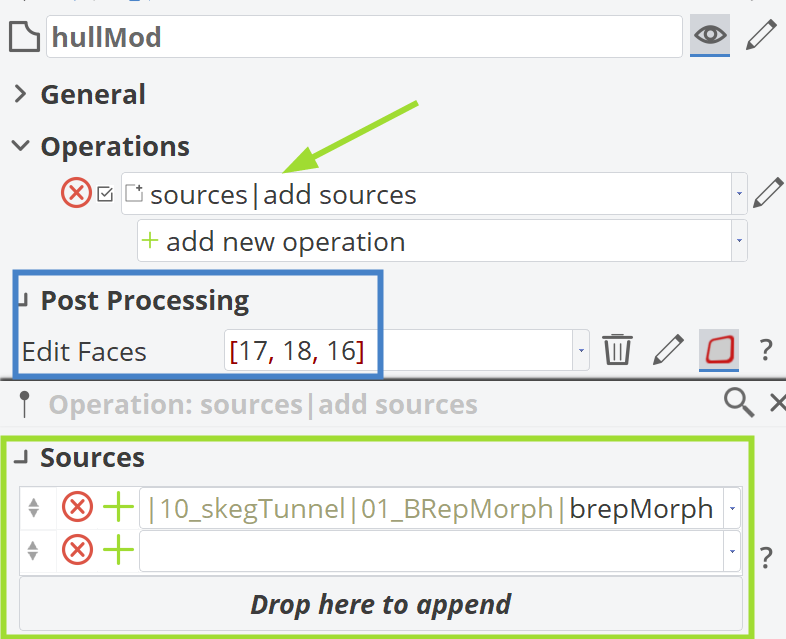
Finally, the unnecessary faces of brepMorph are removed and a new hullMod BRep is defined, as depicted below.
Animating Morphing
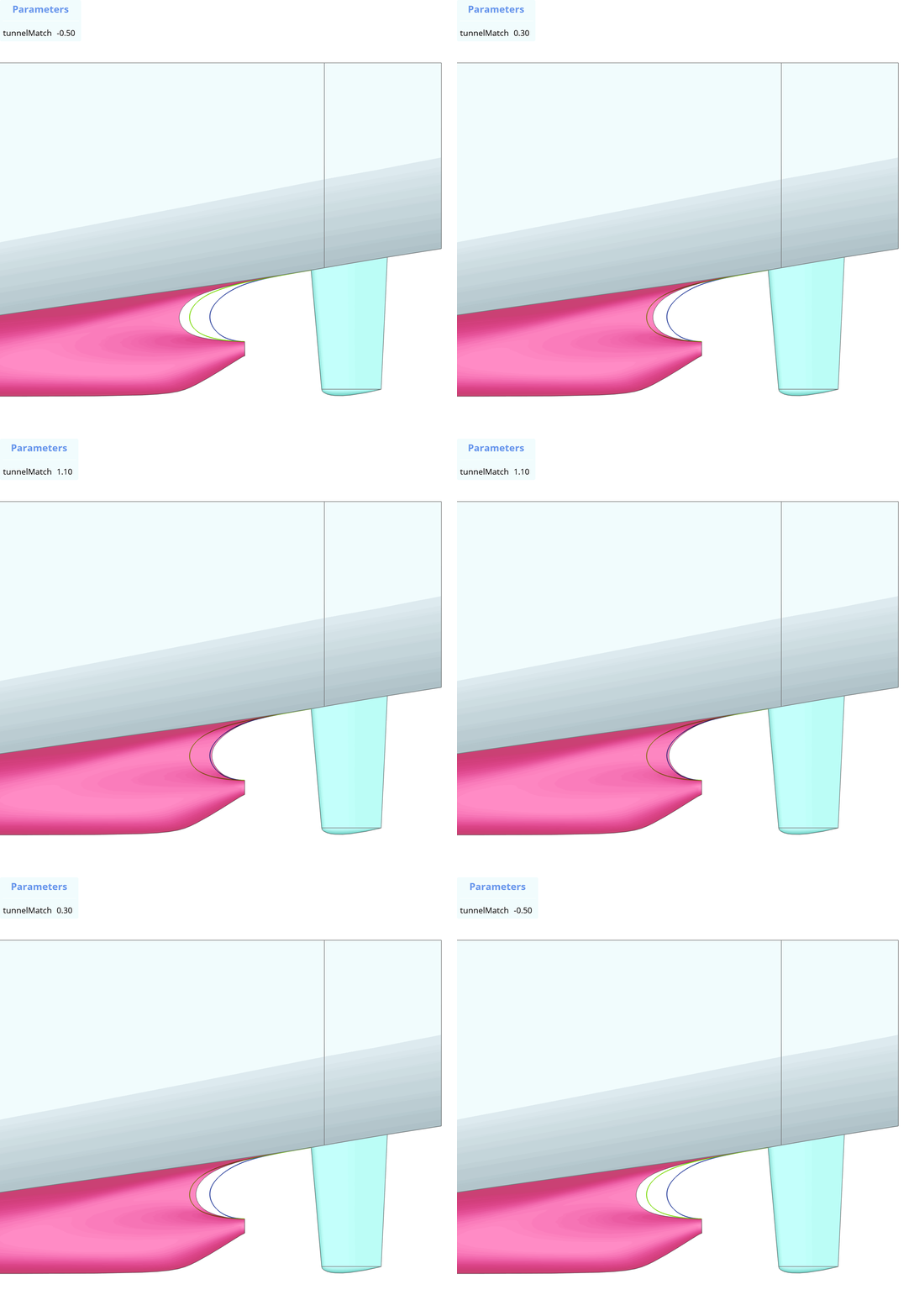
In the animation below, the effect of the Interpolation Factor of the morphing is shown. It can range below 0 and above 1.
Scope Stucture
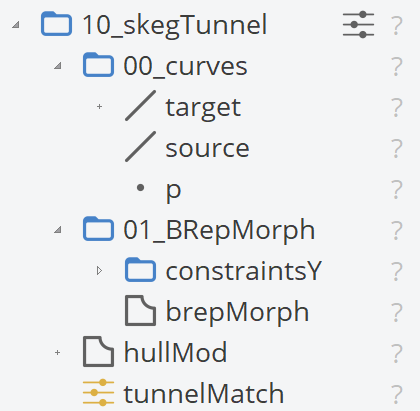
The final structure of the scope |10_skegTunnel| is illustrated below.
Knuckle
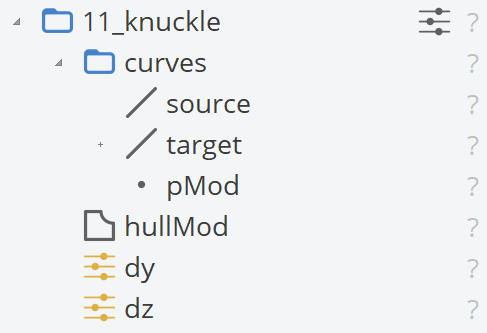
In this section, we will demonstrate some deformations related to the knuckle curve. To do this, a new scope named |11_knuckle| will be created, along with two new design variables in this scope: dy and dz, both ranging from -0.25 to 0.25.
Curves
Similar to the skeg tunnel deformations, we need to define a source and target curve. A new sub-scope named |11_knuckle|curves| will be created for this purpose.
Source
The source curve corresponds to the knuckle curve, but we will describe it using a 3rd-degree B-Spline curve with 4 control points, as listed below:
| Point List |
|---|
[103.04663217, 4.04503562, 4.46354053] |
[107.94857629, 2.65164694, 5.02569067] |
[112.85456501, 1.21459782, 5.57951433] |
[117.7270465, 0, 6.64431725] |
Additionally, a 3D point named pMod is generated with the following coordinates:
- X: source:Start:X
- Y: source:Start:Y + |11_knuckle|dy
- Z: source:Start:Z + |11_knuckle|dz
Target
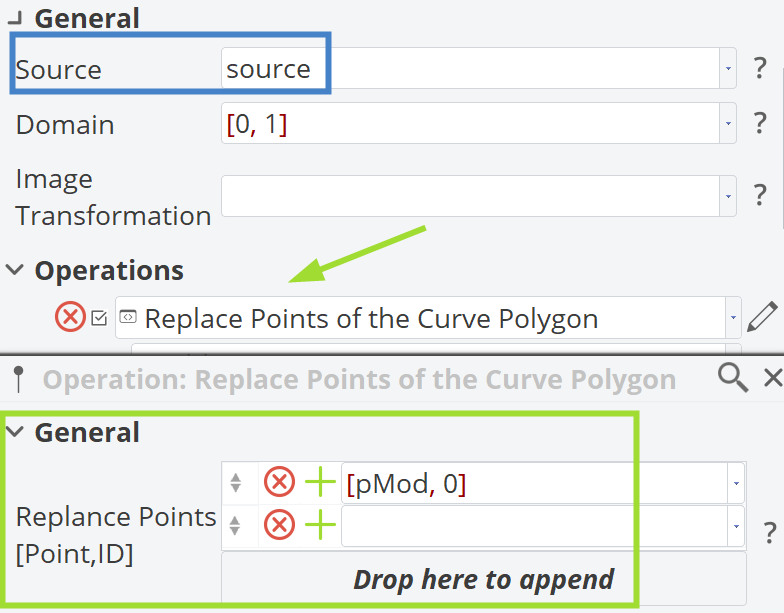
The target curve is an image of the source curve, but the first point of the control polygon is replaced with the pMod point, as shown below.
BRep Morphing
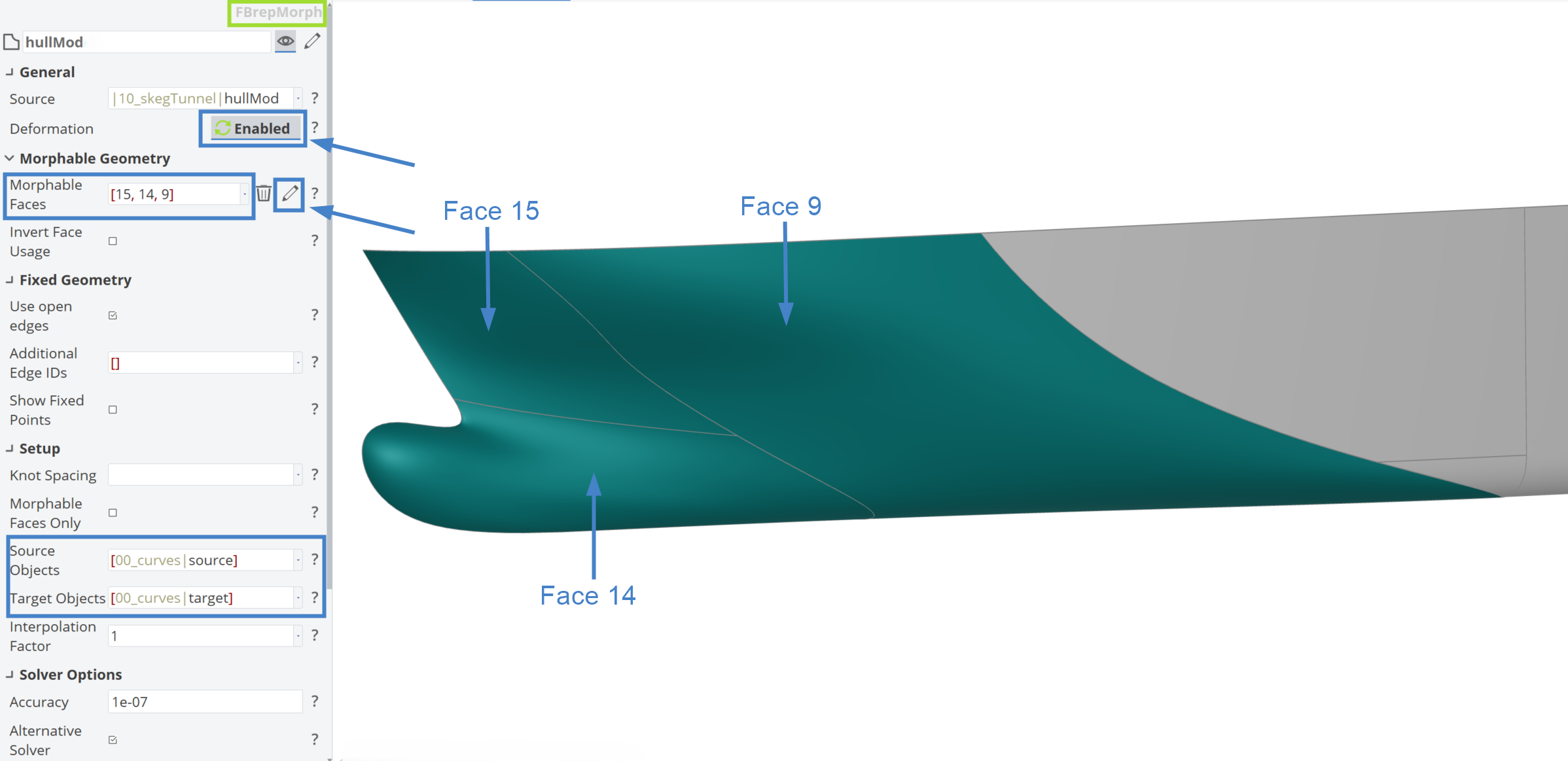
The following figure demonstrates how this BRep Morph is set up by using |10_skegTunnel|hullMod as the input and Morphable Faces: [15,14,9] with the proper source and target curves. The key difference here is that the Interpolation Factor remains set to 1, meaning the target curve is modified by the design variables and there is always a 100% effect on the deformation process.
Animating Morphing
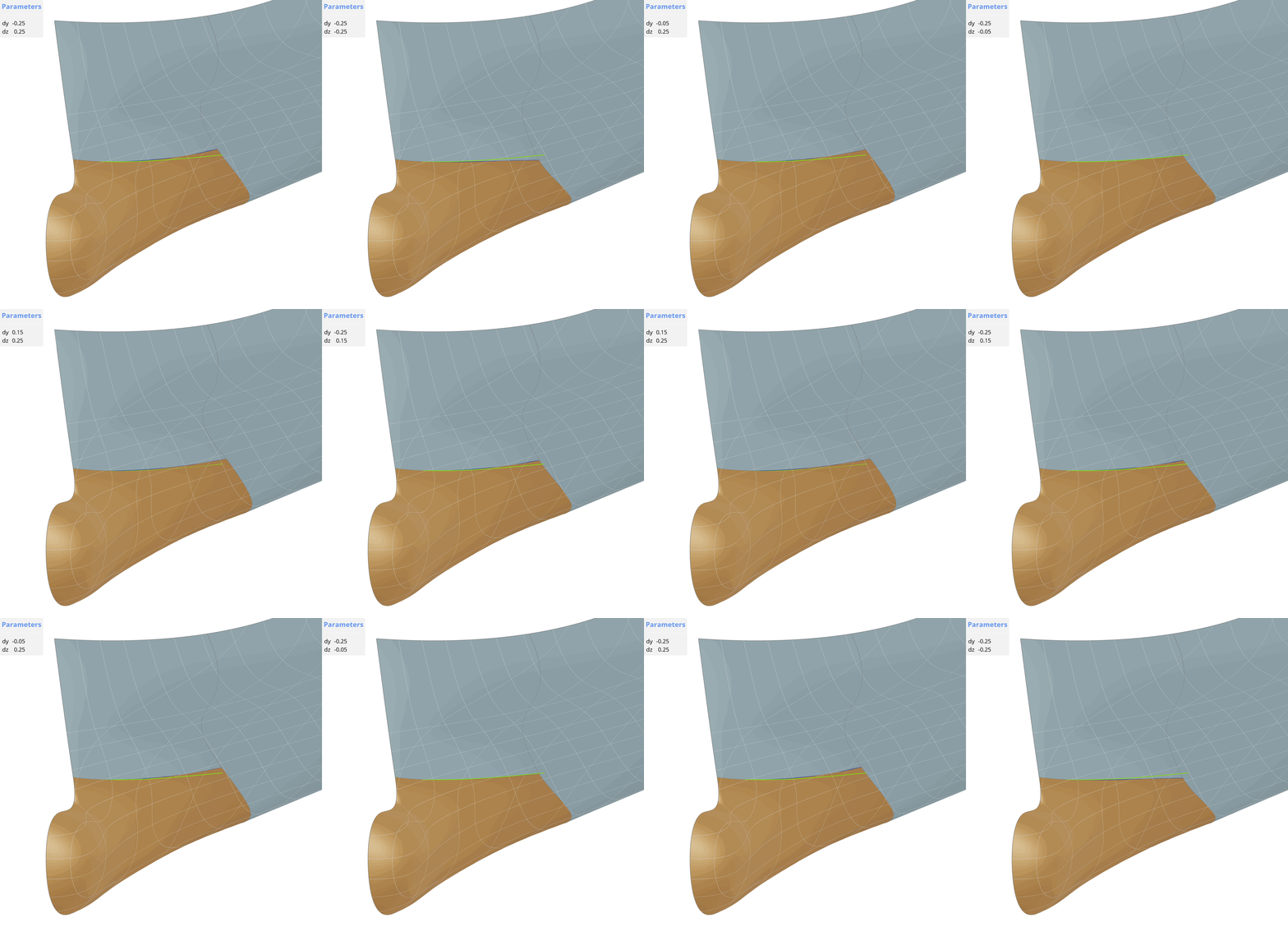
In the animations below, the effects of the design variables |11_knuckle|dy and |11_knuckle|dz on the hull model are shown.
Scope Stucture
The final scope structure of |11_knuckle| is shown below.
Bow
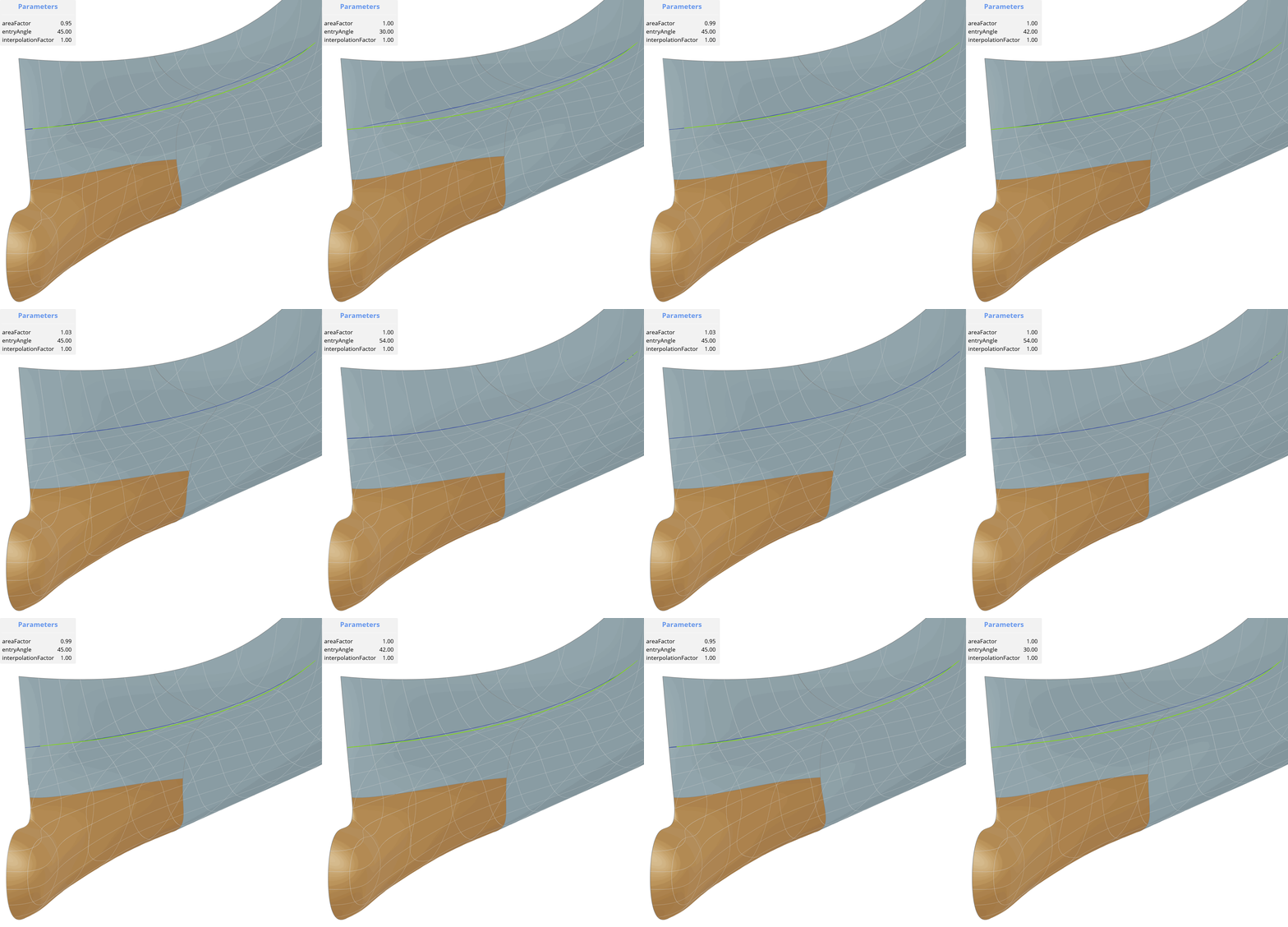
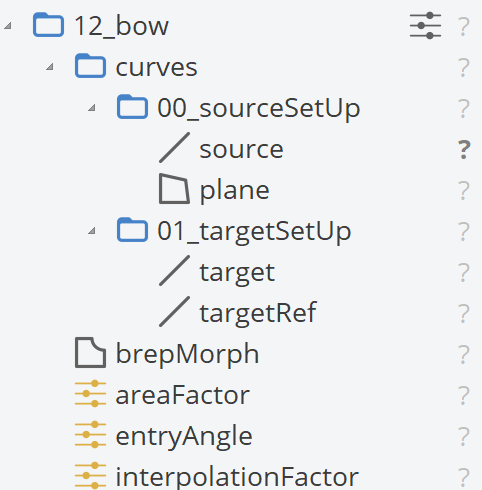
Continuing with the bow region, which is commonly deformed in the maritime industry, a new scope is created named |12_bow|. This scope contains three design variables: areaFactor (Range: [0.95, 1.05]), entryAngle (Range: [30, 60]) and interpolationFactor (Range: [0, 1]).
Curves
Similarly, for this deformation, source and target curves will be utilized. A new sub-scope is created, |12_bow|curves| and under this sub-scope, two more scopes are created: |12_bow|curves|00_sourceSetUp| and |12_bow|curves|01_targetSetUp|.
Source
A plane is created for the source curve generation using the following points:
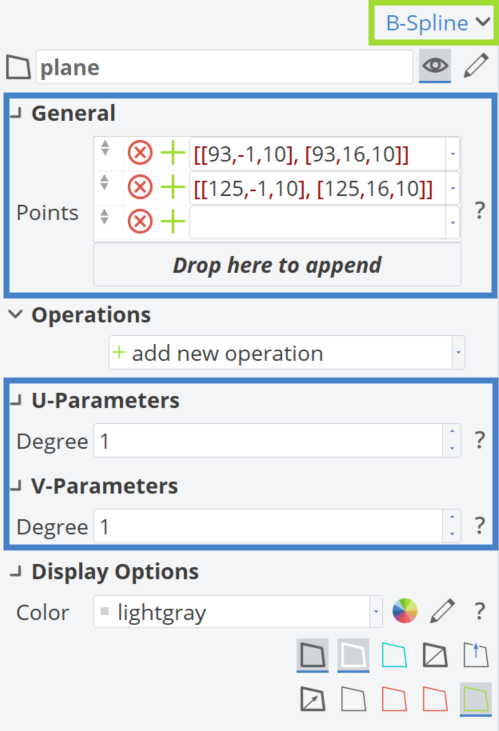
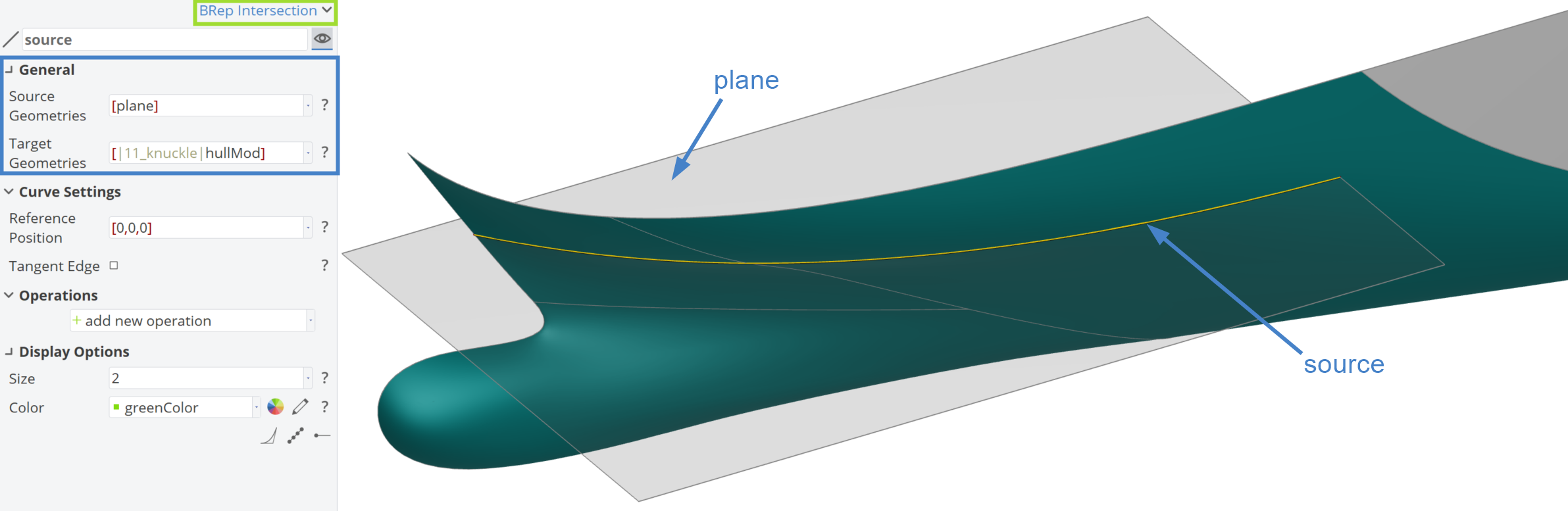
Then, the source is a BRep Intersection curve from the |11_knuckle|hullMod and the plane, as depicted below:
Target
For the target curve, a reference curve named targetRef will be used initially. This is an F-Spline curve, as shown below:
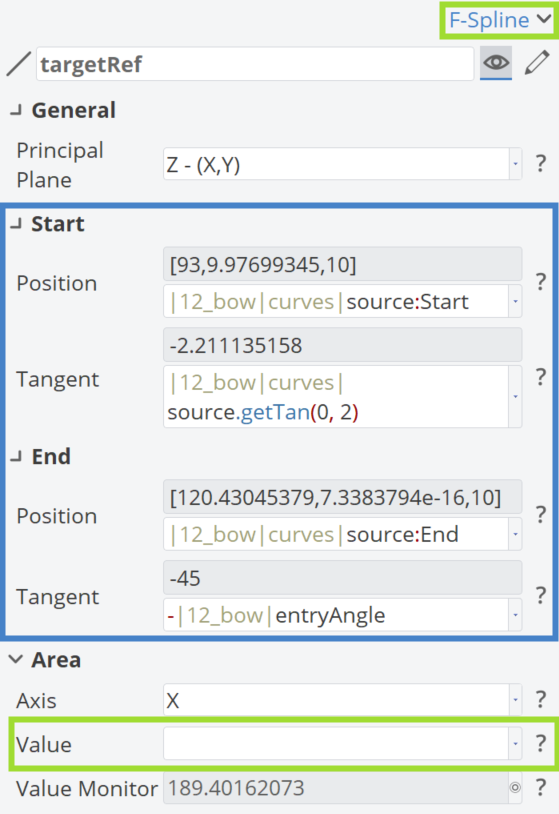
The target curve is an F-Spline with the same properties as the above one, but the green rectangle is filled with this expression: Area|Value: |12_bow|curves|01_targetSetUp|targetRef.getArea(0, 2) * |12_bow|areaFactor.
BRep Morphing
Here, a BRep Morph is applied with the same faces to be morphed as in the Knuckle section, namely 15, 14 and 9. The input is the |11_knuckle|hullMod, while the Source and Target Geometries are the ones generated above. The Interpolation Factor is linked to the |12_bow|interpolationFactor design variable. In this setup, both the Target Geometry and the Interpolation Factor can be adjusted.
Animating Morphing
In the animations below, the effects of the BRep Morphing on the bow region are presented:
Scope Structure
The final scope structure of |12_bow| is shown in the following figure.
Final Hull
With all the Delta Transformations and BRep morphings completed, a new scope named |100_finalHull| is created, containing the BRep hullModified. The source for this scope is |12_bow|brepMorph and the Data Reduction Tolerance is set to 0.01 to avoid any potential tessellation issues.
While it’s unlikely that all these deformations will be needed simultaneously, these examples serve as best practices, tips and tricks. This approach allows you to explore new methods, offering a variety of choices and inspiring fresh ideas. Ultimately, it provides a foundation for creating your own Partially Parametric Model based on an imported ship hull geometry.
For this modified geometry, we will also calculate a few hydrostatic parameters and optimize it based on a Hard Point constraint.
Hard Point
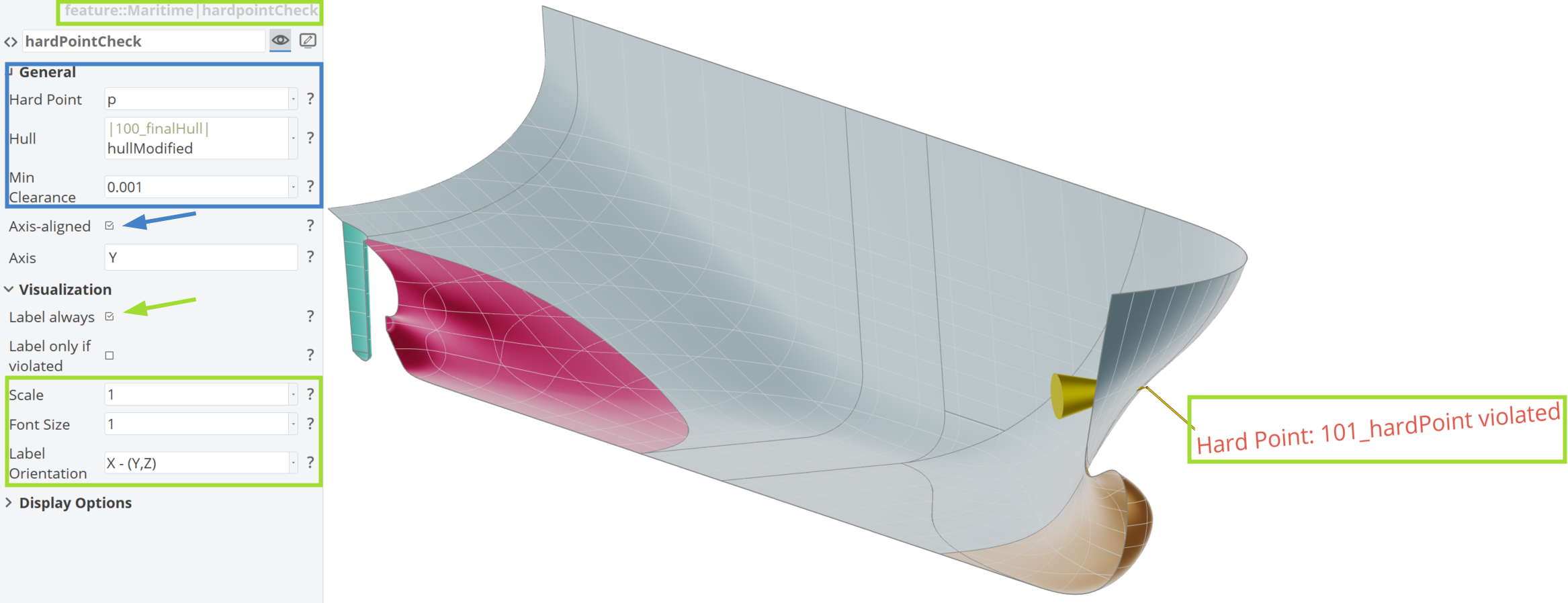
Defining a Hard Point within CAESES is straightforward. For this task, a new scope named |101_hardPoint| is created and a 3D point named p within this scope is used for the Hard Point with the following coordinates:
- X: 112
- Y: 4.5
- Z: 8.5
The following figure demonstrates how the Hard Point feature hardPointCheck is defined. This feature is located in the Maritime Tab.
Hydrostatics Parameters
The hydrostatic parameters defined in the scope |102_hydrostatics| are based on a draft = 6, which is a user-defined input and can be adjusted. These parameters also depend on the triangulation of the BRep |100_finalHull|hullModified. Below is an explanation of how the Displacement (dpl), Longitudinal Center of Buoyancy (LCB) and Wetted Surface (ws) are calculated within CAESES.
dpl = |100_finalHull|hullModified.getDisplacement(draft, 0, 0).at(0).castTo(FDouble)LCB = |100_finalHull|hullModified.getDisplacement(draft, 0, 0).at(2).castTo(FVector3):Xws = |100_finalHull|hullModified.getDisplacement(draft, 0, 0).at(1).castTo(FDouble)
Optimization
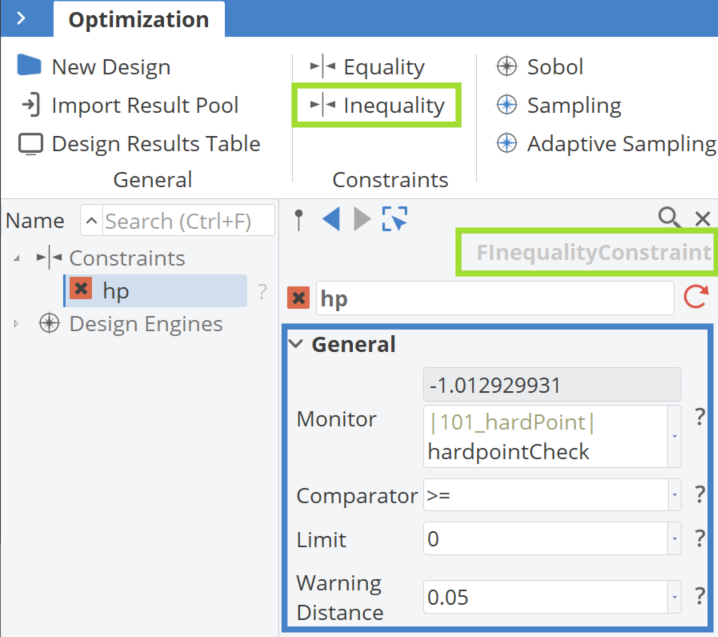
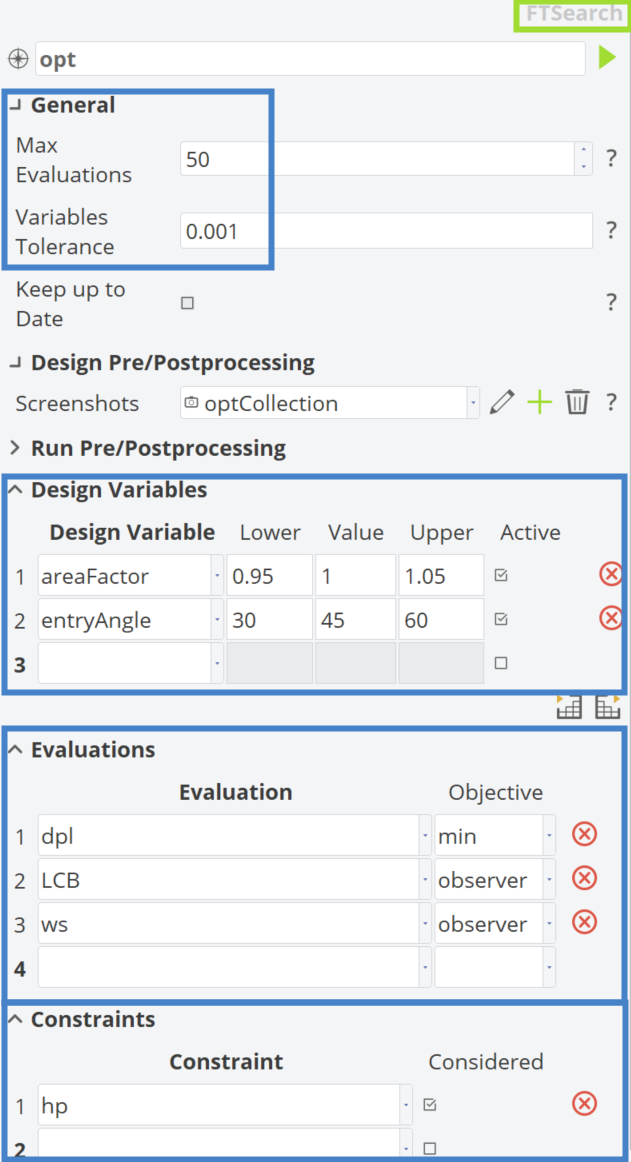
Finally, an optimization process is defined as a simple example by optimizing the hull using the TSearch algorithm, a reliable option in CAESES for single-objective optimization. The objective function in this optimization is to minimize the |102_hydrostatics|dpl while adhering to the Hard Point Constraint.
Objective Function
The objective function for this optimization is to minimize the displacement of the hull (|102_hydrostatics|dpl), which is often desirable and can be calculated quickly in CAESES, as demonstrated earlier. Additionally, the |102_hydrostatics|LCB and |102_hydrostatics|ws values are monitored.
Constraint
The optimization will be subject to a Inequality Constraint, ensuring that the hull does not exceed the position set for the Hard Point. The figure below demonstrates how to define such x a constraint in CAESES.
Design Variables
The design variables chosen for this optimization are those introduced in the Bow section, as they affect the deformation of the hull near the Hard Point.
- |12_bow|areaFactor
- |12_bow|entryAngle
Algorithm
Inside CAESES, there are several options for single-objective optimization, as shown below. One reliable option for this kind of problem is the TSearch algorithm.

The setup for this optimization algorithm, based on the aforementioned properties, is presented below.
Optimization Results
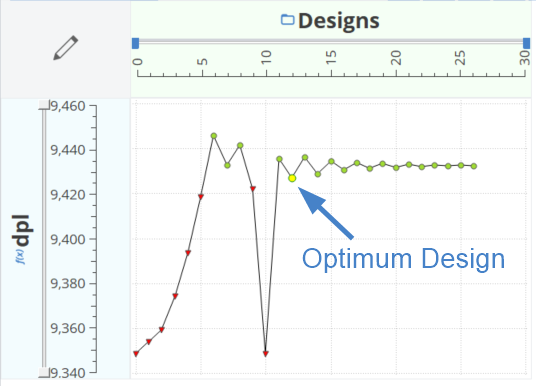
The optimization results are presented in the following diagram, with red triangles indicating violated designs and green circles representing valid ones. The optimal design is highlighted, with design variables areaFactor = 1.0423242 and entryAngle = 55.297852.
Conclusions
In this tutorial, various Partially Parametric Modeling techniques were presented. Additionally, many useful functionalities of CAESES were introduced to set them up.
CAESES Project File
If you want to take a look at the finalized parametric model you can find the resulting CAESES project file shape-morphing-shiphull.cdb here: